@trycompai/comp
BThe open-source compliance platform.
Install
agr install @trycompai/comp --target cursorWrites 1 file into .cursor/rules/, pinned to git-986f2edb.
- .cursorrules
Document
API Rules
Read CLAUDE.md in this directory for comprehensive API development guidelines.
Quick Reference
- Auth: Session-based only (no JWT).
HybridAuthGuard+PermissionGuardon every endpoint. - RBAC:
@RequirePermission('resource', 'action')required. Without it,AuditLogInterceptorwon't log. - Controller:
@Controller({ path: 'name', version: '1' }), NOT@Controller('v1/name')(double prefix bug). - Tests: Every feature needs tests.
npx jest src/<module> --passWithNoTests. - No
as any. Max 300 lines per file. - Multi-tenancy: Always scope DB queries by
organizationId. - Billing errors:
HttpExceptionwithHttpStatus.PAYMENT_REQUIRED(no PaymentRequiredException). - Webhooks: Use
@Public()decorator. - Nested JSON: Use
@Req() req+req.bodyinstead of DTO when receiving complex nested objects. - Permission resources: organization, member, control, evidence, policy, risk, vendor, task, framework, audit, finding, questionnaire, integration, apiKey, trust, pentest, app, compliance
Testing
Every new feature MUST include tests. This is mandatory, not optional.
# Run tests for a specific module
npx jest src/<module-name> --passWithNoTests

# Run all API tests
npx turbo run test --filter=@trycompai/api

# Type-check
npx turbo run typecheck --filter=@trycompai/api
Test File Conventions
- Colocate:
foo.service.ts→foo.service.spec.ts - Mock external deps (DB, external APIs)
- Test success, error, and edge cases
- Override guards in controller tests with
.overrideGuard(HybridAuthGuard).useValue({ canActivate: () => true })
Code Style
- Use
@AuthContext()for auth context,@OrganizationId()for org ID - NestJS exceptions:
BadRequestException,NotFoundException,ForbiddenException - Prisma via
@trycompai/db, always scope byorganizationId - Transactions for multi-record operations
Repository README
Describes trycompai/comp as a whole, which may contain artifacts other than this one. Where this artifact had no useful description of its own, its summary was taken from here.
About
AI that handles compliance for you in hours.
Comp AI is the fastest way to get compliant with frameworks like SOC 2, ISO 27001, HIPAA and GDPR. Comp AI automates evidence collection, policy management, and control implementation while keeping you in control of your data and infrastructure.
Recognition
ProductHunt
Vercel
Built With
Contact us
Contact our founders at hello@trycomp.ai to learn more about how we can help you achieve compliance.
Stay Up-to-Date
Get access to the cloud hosted version of Comp AI.
Getting Started
To get a local copy up and running, please follow these simple steps.
Prerequisites
Here is what you need to be able to run Comp AI.
- Node.js (Version: >=20.x)
- Bun (Version: >=1.1.36)
- Postgres (Version: >=15.x)
Development
To get the project working locally with all integrations, follow these extended development steps
Setup
Add environment variables and fill them out with your credentials
cp apps/app/.env.example apps/app/.env
cp apps/portal/.env.example apps/portal/.env
cp packages/db/.env.example packages/db/.env
Get code running locally
- Clone the repo
git clone https://github.com/trycompai/comp.git
- Navigate to the project directory
cd comp
- Install dependencies using Bun
bun install
- Get Database Running
cd packages/db
bun run docker:up # Spin up docker container
bun run db:migrate # Run migrations
- Generate Prisma Types for each app
cd apps/app
bun run db:generate
cd ../portal
bun run db:generate
cd ../api
bun run db:generate
- Run all apps in parallel from the root directory
bun run dev
Environment Setup
Create the following .env files and fill them out with your credentials
comp/apps/app/.envcomp/apps/portal/.envcomp/packages/db/.env
You can copy from the .env.example files:
Linux / macOS
cp apps/app/.env.example apps/app/.env
cp apps/portal/.env.example apps/portal/.env
cp packages/db/.env.example packages/db/.env
Windows (Command Prompt)
copy apps\app\.env.example apps\app\.env
copy apps\portal\.env.example apps\portal\.env
copy packages\db\.env.example packages\db\.env
Windows (PowerShell)
Copy-Item apps\app\.env.example -Destination apps\app\.env
Copy-Item apps\portal\.env.example -Destination apps\portal\.env
Copy-Item packages\db\.env.example -Destination packages\db\.env
Additionally, ensure the following required environment variables are added to .env in comp/apps/app/.env:
AUTH_SECRET=""                  # Use `openssl rand -base64 32` to generate
DATABASE_URL="postgresql://user:password@host:port/database"
RESEND_API_KEY="" # Resend (https://resend.com/api-keys) - Resend Dashboard -> API Keys
NEXT_PUBLIC_PORTAL_URL="http://localhost:3002"
REVALIDATION_SECRET=""         # Use `openssl rand -base64 32` to generate
✅ Make sure you have all of these variables in your
.envfile. If you're copying from.env.example, it might be missing the last two (NEXT_PUBLIC_PORTAL_URLandREVALIDATION_SECRET), so be sure to add them manually.
Some environment variables may not load correctly from .env — in such cases, hard-code the values directly in the relevant files (see Hardcoding section below).
Cloud & Auth Configuration
1. Trigger.dev
- Create an account on https://cloud.trigger.dev
- Create a project and copy the Project ID
- In
comp/apps/app/trigger.config.ts, set:project: 'proj_****az***ywb**ob*';
2. Google OAuth
-
Create an OAuth client:
- Type: Web Application
- Name:
comp_app# You can choose a different name if you prefer!
-
Add these Authorized Redirect URIs:
http://localhost http://localhost:3000 http://localhost:3002 http://localhost:3000/api/auth/callback/google http://localhost:3002/api/auth/callback/google http://localhost:3000/auth http://localhost:3002/auth -
After creating the app, copy the
GOOGLE_IDandGOOGLE_SECRET- Add them to your
.envfiles - If that doesn’t work, hard-code them in:
comp/apps/portal/src/app/lib/auth.ts
- Add them to your
3. Redis (Upstash)
- Go to https://console.upstash.com
- Create a Redis database
- Copy the Redis URL and TOKEN
- Add them to your
.envfile, or hard-code them if the environment variables are not being recognized in:comp/packages/kv/src/index.ts
Database Setup
Start and initialize the PostgreSQL database using Docker:
-
Start the database:
cd packages/db bun docker:up -
Default credentials:
- Database name:
comp - Username:
postgres - Password:
postgres
- Database name:
-
To change the default password:
ALTER USER postgres WITH PASSWORD 'new_password'; -
If you encounter the following error:
HINT: No function matches the given name and argument types...Run the fix:
psql "postgresql://postgres:<your_password>@localhost:5432/comp" -f ./packages/db/prisma/functionDefinition.sqlExpected output:
CREATE FUNCTION💡
compis the database name. Make sure to use the correct port and database name for your setup. -
Apply schema and seed:
 # Generate Prisma client
 bun db:generate

 # Push the schema to the database
 bun db:push

 # Optional: Seed the database with initial data
 bun db:seed
Other useful database commands:
# Open Prisma Studio to view/edit data
bun db:studio

# Run database migrations
bun db:migrate

# Stop the database container
bun docker:down

# Remove the database container and volume
bun docker:clean
Start Development
Once everything is configured:
bun run dev
Or use the Turbo repo script:
turbo dev
💡 Make sure you have Turbo installed. If not, you can install it using Bun:
bun add -g turbo
🎉 Yay! You now have a working local instance of Comp AI! 🚀
Deployment
Docker
Steps to deploy Comp AI on Docker are coming soon.
Vercel
Steps to deploy Comp AI on Vercel are coming soon.
📦 Package Publishing
This repository uses semantic-release to automatically publish packages to npm when merging to the release branch. The following packages are published:
@trycompai/db- Database utilities with Prisma client@trycompai/email- Email templates and components@trycompai/kv- Key-value store utilities using Upstash Redis@trycompai/ui- UI component library with Tailwind CSS
Setup
- NPM Token: Add your npm token as
NPM_TOKENin GitHub repository secrets - Release Branch: Create and merge PRs into the
releasebranch to trigger publishing - Versioning: Uses conventional commits for automatic version bumping
Usage
# Install a published package
npm install @trycompai/ui

# Use in your project
import { Button } from '@trycompai/ui/button'
import { client } from '@trycompai/kv'
Development
# Build all packages
bun run build

# Build specific package
bun run -F @trycompai/ui build

# Test packages locally
bun run release:packages --dry-run
Contributors
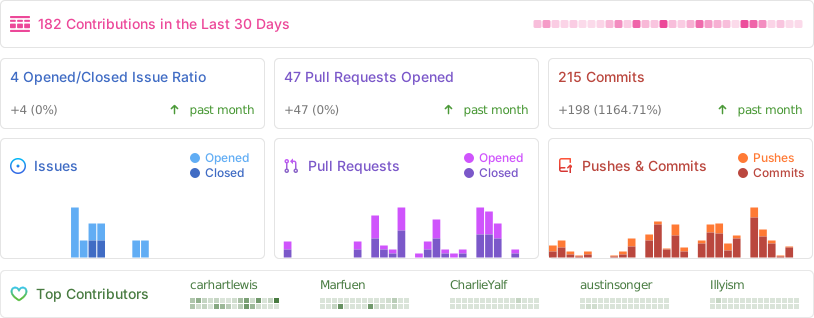
Repo Activity
License
Comp AI, Inc. is a commercial open source company, which means some parts of this open source repository require a commercial license. The concept is called "Open Core" where the core technology (99%) is fully open source, licensed under AGPLv3 and the last 1% is covered under a commercial license (["/ee" Enterprise Edition"]).
[!TIP] We work closely with the community and always invite feedback about what should be open and what is fine to be commercial. This list is not set and stone and we have moved things from commercial to open in the past. Please open a discussion if you feel like something is wrong.
Trustgrade B
- passBody integrity
Whether the stored document is plausibly the kind of file the artifact declares, rather than something fetched by mistake.
- passType matchnot applicable to this artifact type
Whether the artifact is really the kind of thing its metadata claims it is.
- passFreshness
How long since the source repository was last pushed to.
- passPrompt injection
Scans the artifact's own text for instructions aimed at your agent rather than at you.
- warnLicensecopyleft/unknown — index-and-link only
Whether the source repository declares an SPDX license permissive enough to redistribute.
How the grade is calculated
Each check contributes 0 points when it passes, 1 when it warns, and 2 when it fails. The total maps to a letter:
- Aevery check passed
- Bone warning
- Ctwo warnings
- Dprompt injection or body integrity failed, or three warnings
- Fone of those failed, and something else is wrong
These are automated hygiene checks, not a security audit, and not a dependency or vulnerability scan. A grade of A means nothing was flagged — not that the artifact is safe.
Versions
git-986f2edb06062026-08-06