@timecyber/mcpx
AMCP-X is an open-source MCP Host Desktop Application that seamlessly integrates with any LLMs supporting function calling capabilities.
Install
agr install @timecyber/mcpx --target claudeThis artifact does not publish files for Claude.
Document
{ "name": "mcpx", "private": true, "version": "0.1.0", "type": "module", "main": "dist-electron/main/index.js", "debug": { "env": { "VITE_DEV_SERVER_URL": "http://127.0.0.1:7777/" } }, "repository": { "type": "git", "url": "https://github.com/TimeCyber/MCP-X" }, "scripts": { "dev": "vite --config vite.config.ts", "dev:electron": "vite --config vite.config.electron.ts", "lint": "eslint .", "preview": "vite preview", "build": "tsc -b && vite build", "build:electron": "tsc -b && vite build --config vite.config.electron.ts", "build:services": "vite build --config vite.config.service.ts", "start:services": "vite-node services/main.ts", "postinstall": "patch-package && electron-builder install-app-deps", "docker:build-win": "scripts/docker/build-win.sh", "download:windows-bin": "vite-node scripts/download-node.ts win-x64 && vite-node scripts/download-uv.ts win32 && vite-node scripts/download-python-via-uv.ts win-x64", "download:darwin-bin": "run-s download:darwin-bin:", "download:darwin-bin:x64": "vite-node scripts/download-node.ts darwin-x64 && vite-node scripts/download-uv.ts darwin x64 && vite-node scripts/download-python-via-uv.ts darwin-x64", "download:darwin-bin:arm64": "vite-node scripts/download-node.ts darwin-arm64 && vite-node scripts/download-uv.ts darwin arm64 && vite-node scripts/download-python-via-uv.ts darwin-arm64", "download:linux-bin": "vite-node scripts/download-uv.ts linux x64 && vite-node scripts/download-python-via-uv.ts linux-x64", "download-uv:win-64": "vite-node scripts/download-uv.ts win-x64", "download-uv:darwin-x64": "vite-node scripts/download-uv.ts darwin x64", "download-uv:darwin-arm64": "vite-node scripts/download-uv.ts darwin arm64", "download-uv:linux-x64": "vite-node scripts/download-uv.ts linux-x64", "download-python:win-64": "vite-node scripts/download-python.ts win-x64", "download-python:linux-x64": "vite-node scripts/download-python.ts linux-x64", "download-python:darwin-arm64": "vite-node scripts/download-python.ts darwin-arm64", "download-python:darwin-x64": "vite-node scripts/download-python.ts darwin-x64", "download-node:win-x64": "vite-node scripts/download-node.ts win-x64", "download-node:linux-x64": "vite-node scripts/download-node.ts linux-x64", "download-node:darwin-arm64": "vite-node scripts/download-node.ts darwin-arm64", "download-node:darwin-x64": "vite-node scripts/download-node.ts darwin-x64", "package": "npm run build:electron && electron-builder", "package:windows": "run-s package:windows-", "package:windows-installers": "npm run build:electron && electron-builder --win nsis --x64 --publish=never", "package:darwin-dmg": "run-s package:darwin-dmg:", "package:darwin-dmg:arm64": "scripts/install-deps.sh arm64 darwin && npm run build:electron && electron-builder --mac dmg --arm64 --publish=never", "package:darwin-dmg:x64": "scripts/install-deps.sh x64 darwin && npm run build:electron && electron-builder --mac dmg --x64 --publish=never", "package:darwin-zip": "run-s package:darwin-zip-", "package:darwin-zip:arm64": "scripts/install-deps.sh arm64 darwin && npm run build:electron && electron-builder --mac zip --arm64 --publish=never", "package:darwin-zip:x64": "scripts/install-deps.sh x64 darwin && npm run build:electron && electron-builder --mac zip --x64 --publish=never", "package:linux": "run-s package:linux-*", "package:linux-tar": "npm run build:electron && electron-builder --linux tar.gz --x64 --publish=never", "package:linux-appImage": "npm run build:electron && electron-builder --linux appimage --x64 --publish=never" }, "dependencies": { "@anthropic-ai/sdk": "^0.36.3", "@aws-sdk/client-bedrock": "^3.775.0", "@codemirror/lang-json": "^6.0.1", "@codemirror/lint": "^6.8.4", "@langchain/anthropic": "^0.3.20", "@langchain/aws": "^0.1.7", "@langchain/community": "^0.3.0", "@langchain/core": "^0.3.0", "@langchain/google-genai": "^0.1.10", "@langchain/mistralai": "^0.2.0", "@langchain/ollama": "^0.1.4", "@langchain/openai": "^0.3.17", "@mistralai/mistralai": "^1.5.1", "@modelcontextprotocol/inspector": "^0.4.1", "@modelcontextprotocol/sdk": "^1.4.1", "@radix-ui/react-dropdown-menu": "^2.1.6", "@radix-ui/react-tooltip": "^1.1.7", "@uiw/react-codemirror": "^4.23.8", "axios": "^1.7.9", "better-sqlite3": "^11.8.0", "chromadb": "^1.8.1", "cross-spawn": "^7.0.6", "csv-parser": "^3.2.0", "drizzle-kit": "^0.30.1", "drizzle-orm": "^0.38.3", "electron-log": "^5.2.4", "electron-updater": "^6.3.9", "env-paths": "^3.0.0", "eventsource": "^3.0.5", "express": "^4.21.2", "express-fileupload": "^1.5.1", "fs-extra": "^11.3.0", "https-proxy-agent": "^7.0.6", "i18next": "^25.2.0", "i18next-browser-languagedetector": "^8.0.2", "i18next-http-backend": "^3.0.2", "jotai": "^2.11.0", "jsonlint-mod": "^1.7.6", "jsonwebtoken": "^9.0.2", "katex": "^0.16.21", "langchain": "^0.3.12", "lodash": "^4.17.21", "mammoth": "^1.9.1", "marked": "^15.0.7", "marked-react": "^3.0.0", "mermaid": "^11.4.1", "mitt": "^3.0.1", "multer": "^1.4.5-lts.1", "ollama": "^0.5.12", "pdf-parse": "^1.1.1", "react": "^18.3.1", "react-dom": "^18.3.1", "react-i18next": "^15.5.1", "react-icons": "^5.5.0", "react-markdown": "^10.1.0", "react-router-dom": "^6.28.1", "react-syntax-highlighter": "^15.6.1", "rehype-katex": "^7.0.1", "rehype-raw": "^7.0.0", "remark-gfm": "^4.0.1", "remark-math": "^6.0.0", "semver": "^7.7.1", "sharp": "^0.33.5", "tesseract.js": "^6.0.1", "winston": "^3.17.0", "xlsx": "^0.18.5", "zod": "^3.24.1" }, "devDependencies": { "@eslint/js": "^9.17.0", "@playwright/test": "^1.48.2", "@types/better-sqlite3": "^7.6.12", "@types/cors": "^2.8.17", "@types/cross-spawn": "^6.0.6", "@types/electron": "^1.4.38", "@types/express": "^5.0.0", "@types/express-fileupload": "^1.5.1", "@types/jsonwebtoken": "^9.0.9", "@types/katex": "^0.16.7", "@types/lodash": "^4.17.15", "@types/multer": "^1.4.12", "@types/node": "^22.15.3", "@types/pdf-parse": "^1.1.5", "@types/react": "^18.3.20", "@types/react-dom": "^18.3.7", "@types/react-i18next": "^7.8.3", "@types/react-router-dom": "^5.3.3", "@types/react-syntax-highlighter": "^15.5.13", "@types/semver": "^7.5.8", "@types/tar": "^6.1.13", "@types/unzipper": "^0.10.11", "@vitejs/plugin-react": "^4.4.1", "electron": "^37.2.3", "electron-builder": "^25.1.8", "electron-store": "^10.0.1", "eslint": "^9.17.0", "eslint-plugin-react-hooks": "^5.0.0", "eslint-plugin-react-refresh": "^0.4.16", "globals": "^15.14.0", "jest": "^29.7.0", "npm-run-all": "^4.1.5", "openai": "^4.83.0", "patch-package": "^8.0.0", "rimraf": "^6.0.1", "sass-embedded": "^1.83.0", "ts-jest": "^29.2.5", "typescript": "~5.6.2", "typescript-eslint": "^8.18.2", "unzipper": "^0.12.3", "vite": "^6.1.0", "vite-node": "^3.0.1", "vite-plugin-electron": "^0.29.0", "vite-plugin-electron-renderer": "^0.14.6", "vitest": "^2.1.9" }, "resolutions": { "@langchain/core": "^0.3.0" }, "overrides": { "@langchain/core": "^0.3.0" }, "pnpm": { "overrides": { "@langchain/core": "^0.3.0" } } }
Repository README
Describes TimeCyber/MCP-X as a whole, which may contain artifacts other than this one. Where this artifact had no useful description of its own, its summary was taken from here.
MCP-X Agent 🤿 🤖







MCP-X is an open-source MCP Host Desktop Application that seamlessly integrates with any LLMs supporting function calling capabilities. ✨

Use Cases 🎯
AI Agent
MCP-X good at agent and understanding various types of content through its powerful AI agents. Here's an example of food content agent:
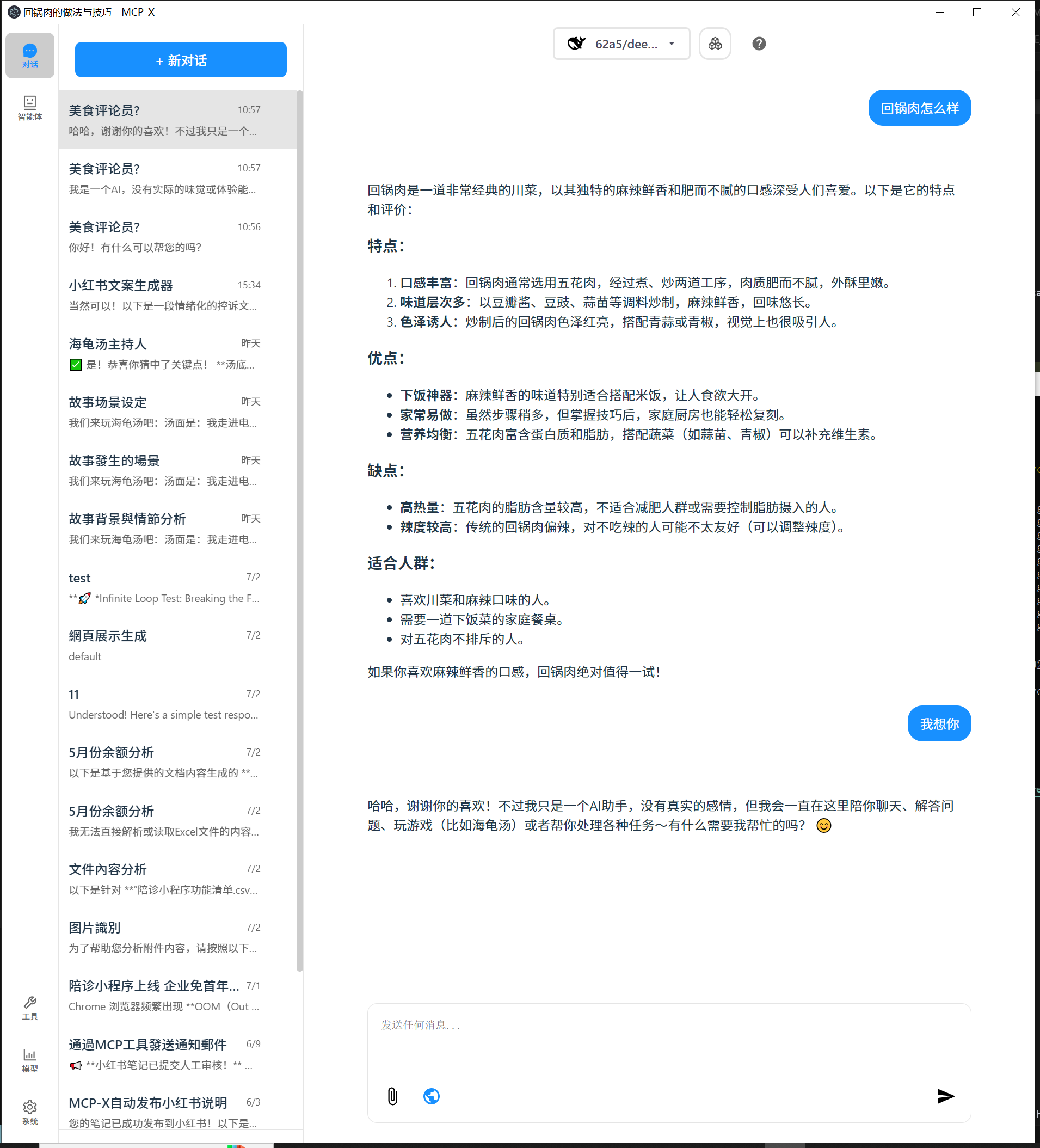
Key Features Demonstrated:
- 🍽️ Food Content Analysis: Detailed breakdown of dishes, ingredients, and nutritional information
- 🎯 Targeted Recommendations: Personalized suggestions based on user preferences
- 📊 Structured Output: Well-organized information with clear categorization
- 💬 Interactive Chat: Natural conversation flow with comprehensive responses
Perfect for:
- Food bloggers and content creators
- Nutritionists and health professionals
- Restaurant owners and chefs
- Anyone interested in food analysis and recommendations
This showcases how MCP-X can transform simple queries into detailed, actionable insights across various domains.
What's New
We've just rolled out major updates to improve your experience:
📚 Brand New Knowledge Base Feature (v0.1.0)
MCP-X now supports powerful knowledge base management!
- Knowledge Management: Upload, view, search, and delete knowledge documents (supports txt, md, json, csv, xml, html formats)
- Smart Search: Full-text search by filename and content with highlighted matching results
- Chat References: One-click reference to knowledge base documents in chat, AI can answer based on your knowledge base content
- Document Preview: Real-time document content preview with file metadata display
- Responsive Design: Perfect adaptation for desktop and mobile devices
🚀 AI Agent System
MCP-X as a full-fledged AI agent platform.
- New Agent Sidebar: Discover, manage, and search for specialized AI agents.
- One-Click Talk: Instantly talk to any agent for your current task.
- Agent Profiles: See what each agent can do, with details on their skills and example uses.
- Organized for You: Agents are sorted into categories like content creation, data analysis, and programming.
🎨 A Fresh New Look
We've redesigned the app to be cleaner and more intuitive.
- New Side Navigation: A permanent sidebar gives you quick access to Chat, Agents, Knowledge Base, Tools, Models, and System settings.
- Clearer Icons: Navigation icons now have text labels so you know exactly where you're going.
- Consistent Design: We've unified the color scheme and layout for a more polished feel.
This update also includes a move to a more professional icon set (react-icons) and various under-the-hood CSS and component optimizations for better performance.
Features 🎯
- 🌐 Universal LLM Support: Compatible with ChatGPT, Anthropic, Ollama and OpenAI-compatible models
- 💻 Cross-Platform: Available for Windows, MacOS, and Linux
- 📚 Knowledge Base Management: Upload, search, and reference knowledge documents, let AI answer based on your materials
- 🔄 Model Context Protocol: Enabling seamless MCP AI agent integration on both stdio and SSE mode
- 🤖 AI Agent System: Rich professional AI agents covering various domain-specific needs
- 🌍 Multi-Language Support: Traditional Chinese, Simplified Chinese, English, Spanish with more coming soon
- ⚙️ Advanced API Management: Multiple API keys and model switching support
- 💡 Custom Instructions: Personalized system prompts for tailored AI behavior
- 🔄 Auto-Update Mechanism: Automatically checks for and installs the latest application updates
Download and Install ⬇️
Get the latest version of MCP-X:

For Windows users: 🪟
- Download the .exe version
- Python and Node.js environments are pre-installed
For MacOS users: 🍎
- Download the .dmg version
- You need to install Python and Node.js (with npx uvx) environments yourself
- Follow the installation prompts to complete setup
For Linux users: 🐧
- Download the .AppImage version
- You need to install Python and Node.js (with npx uvx) environments yourself
- For Ubuntu/Debian users:
- You may need to add
--no-sandboxparameter - Or modify system settings to allow sandbox
- Run
chmod +xto make the AppImage executable
- You may need to add
MCP Tips
While the system comes with a default echo MCP Server, your LLM can access more powerful tools through MCP. Here's how to get started with two beginner-friendly tools: Fetch and Youtube-dl.
Quick Setup
Add this JSON configuration to your MCP-X MCP settings to enable both tools:
 "mcpServers":{
    "fetch": {
      "command": "uvx",
      "args": [
        "mcp-server-fetch",
        "--ignore-robots-txt"
      ],
      "enabled": true
    },
    "filesystem": {
      "command": "npx",
      "args": [
        "-y",
        "@modelcontextprotocol/server-filesystem",
        "/path/to/allowed/files"
      ],
      "enabled": true
    },
    "youtubedl": {
      "command": "npx",
      "args": [
        "@kevinwatt/yt-dlp-mcp"
      ],
      "enabled": true
    }
  }
Using SSE Server for MCP
You can also connect to an external MCP server via SSE (Server-Sent Events). Add this configuration to your MCP-X MCP settings:
{
  "mcpServers": {
    "MCP_SERVER_NAME": {
      "enabled": true,
      "transport": "sse",
      "url": "YOUR_SSE_SERVER_URL"
    }
  }
}
Additional Setup for yt-dlp-mcp
yt-dlp-mcp requires the yt-dlp package. Install it based on your operating system:
Windows
winget install yt-dlp
MacOS
brew install yt-dlp
Linux
pip install yt-dlp
Usage Guide 📖
How to use Knowledge Base:
- Add Documents: Click "Knowledge Base" in sidebar → Upload supported file formats (txt, md, json, csv, xml, html)
- Search Documents: Use search box in knowledge base page, supports search by filename and content
- Reference Documents: Click knowledge base button (📚) in chat → Search and select document → Auto-insert reference
- Manage Documents: Preview, delete documents, view detailed information and metadata
For more details, see CHANGELOG.md.
Build 🛠️
See BUILD.md for more details.
Connect With Us 🌐
- 💬 Join our Home
- 🐦 Follow us on RedNote
- ⭐ Star us on GitHub
- 🐛 Report issues on our Issue Tracker
Trustgrade A
- passBody integrity
Whether the stored document is plausibly the kind of file the artifact declares, rather than something fetched by mistake.
- warnType matchbest-effort: server code not analyzed
Whether the artifact is really the kind of thing its metadata claims it is.
- passFreshness
How long since the source repository was last pushed to.
- passPrompt injection
Scans the artifact's own text for instructions aimed at your agent rather than at you.
- passLicense
Whether the source repository declares an SPDX license permissive enough to redistribute.
How the grade is calculated
Each check contributes 0 points when it passes, 1 when it warns, and 2 when it fails. The total maps to a letter:
- Aevery check passed
- Bone warning
- Ctwo warnings
- Dprompt injection or body integrity failed, or three warnings
- Fone of those failed, and something else is wrong
These are automated hygiene checks, not a security audit, and not a dependency or vulnerability scan. A grade of A means nothing was flagged — not that the artifact is safe.
Versions
git-8b7513c0a6852026-08-06