@shlomiuziel/asher
AA secure, local-first financial data aggregator for Israeli banks and credit card companies, built with TypeScript and powered by israeli-bank-scrapers.
Install
agr install @shlomiuziel/asher --target claudeThis artifact does not publish files for Claude.
Document
{ "name": "asher", "version": "1.0.0", "description": "Personal MCP server for financial data aggregation from Israeli banks", "main": "dist/index.js", "type": "module", "bin": { "asher": "./dist/cli/index.js" }, "exports": { ".": "./dist/index.js" }, "directories": { "doc": "doc", "test": "tests" }, "scripts": { "prepare": "husky install", "start": "tsx src/main.ts", "start:dev": "nodemon --watch 'src//*.ts' --exec 'tsx' src/main.ts", "start:mcp": "tsx src/mcp/Server.ts", "start:mcp:inspector": "npx @modelcontextprotocol/inspector node dist/mcp/Server.js", "test": "vitest run", "test:watch": "vitest", "test:mcp": "vitest run src/tests/mcp", "build": "tsc", "build:watch": "tsc --watch", "lint": "eslint . --ext .ts,.tsx --fix", "lint:check": "eslint . --ext .ts,.tsx", "format": "prettier --write "src//.{ts,js,json,md}"", "format:check": "prettier --check "src/**/.{ts,js,json,md}"", "typecheck": "tsc --noEmit", "cli": "node --no-warnings=ExperimentalWarning --import tsx ./src/cli/index.ts", "ingest-creds": "node --no-warnings=ExperimentalWarning --import tsx ./src/cli/index.ts ingest-creds", "configure:claude": "node --no-warnings=ExperimentalWarning --import tsx ./src/cli/index.ts configure:claude" }, "lint-staged": { "src//*.{js,ts,tsx}": [ "eslint --fix", "prettier --write" ], "nextjs-mcp//.{js,ts,tsx}": [ "cd nextjs-mcp && eslint --fix", "cd nextjs-mcp && prettier --write" ], ".{json,md,yml,yaml}": [ "prettier --write" ] }, "keywords": [ "mcp", "finance", "israel", "banking", "scraper" ], "author": "Shlomi Uziel", "license": "MIT", "dependencies": { "@modelcontextprotocol/sdk": "^1.12.0", "@types/express": "^4.17.21", "appdata-path": "^1.0.0", "better-sqlite3-multiple-ciphers": "^8.6.0", "boxen": "^8.0.1", "chalk": "^5.4.1", "commander": "^11.1.0", "cors": "^2.8.5", "dotenv": "^16.5.0", "express": "^4.18.2", "inquirer": "^9.2.12", "israeli-bank-scrapers": "^6.2.2", "node-fetch": "^3.3.2", "node-notifier": "^10.0.1", "node-sql-parser": "^5.3.9", "pg": "^8.11.3", "tsx": "^4.19.4", "zod": "^3.25.28" }, "devDependencies": { "@types/inquirer": "^9.0.8", "@types/node": "^20.11.28", "@types/node-notifier": "^8.0.5", "@types/node-sql-parser": "^1.0.0", "@types/pg": "^8.10.9", "@types/which": "^3.0.4", "@typescript-eslint/eslint-plugin": "^8.33.0", "@typescript-eslint/parser": "^8.33.0", "@vitest/coverage-v8": "^1.6.1", "@vitest/ui": "^1.6.1", "eslint": "^9.28.0", "eslint-config-prettier": "^10.1.5", "eslint-plugin-prettier": "^5.4.1", "globals": "^16.2.0", "husky": "^9.1.7", "lint-staged": "^16.1.0", "prettier": "^3.5.3", "typescript": "^5.3.3", "vitest": "^1.6.1" }, "engines": { "node": ">=18.0.0" } }
Repository README
Describes shlomiuziel/asher-mcp as a whole, which may contain artifacts other than this one. Where this artifact had no useful description of its own, its summary was taken from here.
Asher - Personal Financial Data MCP Server
Get closer to your own data, on steroids!
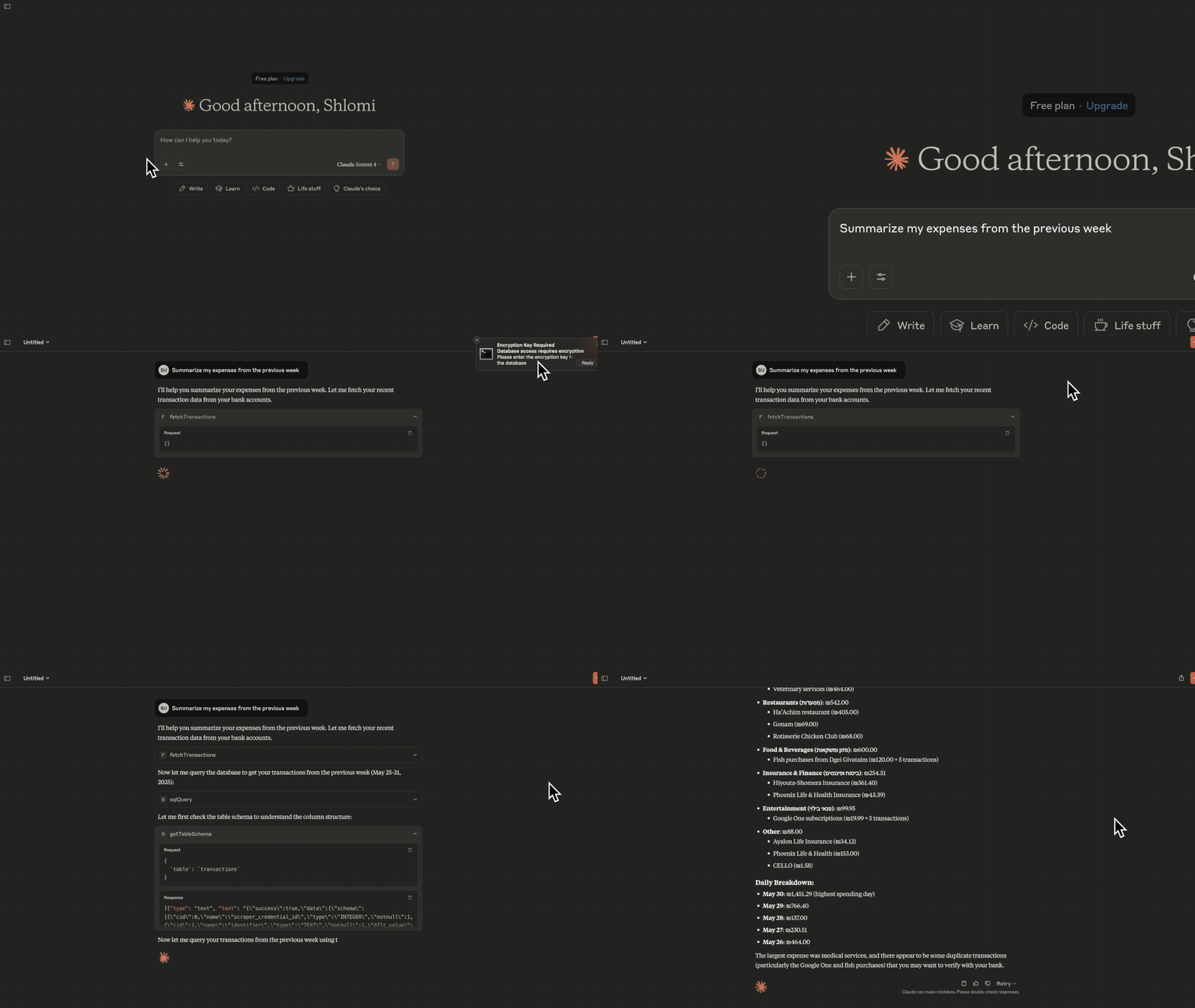
A secure, local-first financial data aggregator for Israeli banks and credit card companies, built with TypeScript and powered by israeli-bank-scrapers. Asher helps you aggregate and analyze your financial transactions across multiple sources while keeping your data private and secure. Information is scraped and stored in a local, encrypted SQLite database.
Features
- MCP Server: Implements the Model Context Protocol for easy integration with MCP Hosts (e.g. Claude)
- Extensive Integration: Supports all Israeli banks and credit card companies provided by israeli-bank-scrapers.
- Local-First: Your financial data never leaves your machine
- Encryption: Sensitive data is encrypted at rest
- CLI: Easy setup and management via command line
- TypeScript: Built with type safety in mind
Prerequisites
- Node.js 18+
- npm
Installation
-
Clone the repository:
git clone https://github.com/shlomiuziel/asher-mcp.git cd asher-mcp -
Install dependencies:
npm install -
Build the project:
npm run build -
Optional: Install the system wide
ashercli command:npm install -g . -
Install tsx (TypeScript Execute) globally (required for Claude desktop integration):
npm install -g tsx
Database Location
The database file is stored in the following location, depending on your OS:
- macOS:
~/Library/Application Support/Asher/database.db - Linux:
~/.local/share/Asher/database.db - Windows:
%APPDATA%/Asher/database.db
First Run & Configuration
-
Prepare a
credentials.jsonfile with your provider credentials. See supported providers and credential fields here. -
Ingest your credentials:
asher ingest-creds -f credentials.json- Use this command to update credentials as needed. Deletion can be done manually (see the
scraper_credentialstable). - You will be prompted to enter an encryption key for your database (for first-time setup, you'll re-enter to confirm).
- Use this command to update credentials as needed. Deletion can be done manually (see the
-
During setup, you will be prompted to:
- Enable notifications (a test notification will help with permissions)
- Optionally perform the first scrape (recommended to avoid latency and possible timeouts due to the large amount of data)
- Configure Claude Desktop integration (can be directly launched with
npm run configure:claude)
Usage
MCP Tools
Asher provides several tools for MCP hosts:
fetchTransactions: Fetch recent transactions and store them in the database.describeTable: Get detailed information about a table (columns, indexes).listTables: List all tables in the database.getTableSchema: Get the schema for a specific table.sqlQuery: Execute a safe SELECT query on allowed tables (prevents SQL injection and unauthorized access).fetch-last-month-transactions: Fetch and summarize last month's transactions and expenses.
A sample prompt is included to help you generate a detailed monthly report.
Test your MCP server
You can run the MCP Inspector for local testing:
npm run start:mcp:inspector
Security
- All sensitive data is encrypted at rest.
- Bank credentials are stored securely inside the database using your encryption key.
- The application follows the principle of least privilege (
chmod 600on the database file). - The encryption key is requested at runtime and never stored on disk.
Testing
Run all tests:
npm test
License
This project is licensed under the MIT License. See the LICENSE file for details.
⚠️ Important Disclaimer
PLEASE READ THIS DISCLAIMER CAREFULLY BEFORE USING THIS SOFTWARE.
This software is designed to help you analyze your financial data and make it accessible to MCP hosts. However, by using this software, you acknowledge and agree to the following:
-
No Warranty: This software is provided "as is," without warranty of any kind, express or implied, including but not limited to the warranties of merchantability, fitness for a particular purpose, and noninfringement.
-
Financial Data Security:
- You are solely responsible for the security of your banking credentials and financial data
- Never share your credentials or encryption keys with anyone
- The developers are not responsible for any unauthorized access to your financial accounts
-
Use at Your Own Risk:
- The developers are not responsible for any financial losses, data loss, or other damages resulting from the use of this software
- Always verify important financial information through official bank channels
- The software may not be compatible with all banking institutions
-
No Liability: In no event shall the authors or copyright holders be liable for any claim, damages, or other liability, whether in an action of contract, tort, or otherwise, arising from, out of, or in connection with the software or the use or other dealings in the software.
-
Third-Party Services: This software may integrate with third-party services. The developers are not responsible for the actions, content, or policies of these third parties.
By using this software, you acknowledge that you have read this disclaimer and agree to be bound by its terms.
Trustgrade A
- passBody integrity
Whether the stored document is plausibly the kind of file the artifact declares, rather than something fetched by mistake.
- warnType matchbest-effort: server code not analyzed
Whether the artifact is really the kind of thing its metadata claims it is.
- passFreshness
How long since the source repository was last pushed to.
- passPrompt injection
Scans the artifact's own text for instructions aimed at your agent rather than at you.
- passLicense
Whether the source repository declares an SPDX license permissive enough to redistribute.
How the grade is calculated
Each check contributes 0 points when it passes, 1 when it warns, and 2 when it fails. The total maps to a letter:
- Aevery check passed
- Bone warning
- Ctwo warnings
- Dprompt injection or body integrity failed, or three warnings
- Fone of those failed, and something else is wrong
These are automated hygiene checks, not a security audit, and not a dependency or vulnerability scan. A grade of A means nothing was flagged — not that the artifact is safe.
Versions
git-efe4b062d7872026-08-06