@microsoft/physical-ai-toolchain
Physical AI and robotics are moving from headlines and experimentation into real-world industrial deployment.
Install
agr install @microsoft/physical-ai-toolchain --target copilotWrites 1 file into .github/copilot-instructions.md, pinned to git-d7401efb.
- .github/copilot-instructions.md
Document
description: 'Required general instructions for entire codebase and project' applyTo: '**'
General Instructions
Conventions, domain knowledge, and non-obvious patterns for agents working in this repository. Items in HIGHEST PRIORITY sections override conflicting guidance.
HIGHEST PRIORITY
Breaking changes: Do not add backward-compatibility layers or legacy support unless explicitly requested. Breaking changes are acceptable.
Artifacts: Do not create or modify tests, scripts, or one-off markdown docs unless explicitly requested.
Environment-specific artifacts: Never commit values discovered from a deployed environment, including Azure resource identifiers, subscription or tenant identifiers, service endpoints, cluster or registry names, generated OSMO platform values, image digest manifests, kubeconfigs, OSMO profiles, and credential files.
- Generate non-secret deployment details under
infrastructure/setup/generated/<environment>/, which is gitignored, by following.github/skills/environment-deployment/SKILL.md. - Keep kubeconfigs, OSMO profiles, tokens, registry credentials, Terraform state, and other secrets outside the generated bundle and outside Git.
- Treat checked-in RFC1918 addresses, resource shapes, and other clearly documented values as instructional defaults or examples. Do not remove or replace them solely because they resemble environment configuration.
Comment policy: Never include thought processes, step-by-step reasoning, or narrative comments in code.
- Keep comments brief and factual; describe behavior/intent, invariants, edge cases.
- Remove or update comments that contradict the current behavior. Do not restate obvious functionality.
- Do NOT add temporal or plan-phase markers (e.g. "Phase 1 cleanup", "... after migration", dates, or task references) to code files. When editing or updating any code files, always remove or replace these types of comments.
Conventions and Styling: Always follow conventions and styling in this codebase FIRST for all changes, edits, updates, and new files.
Proactive fixes: Always fix problems and errors you encounter, even if unrelated to the original request. Prefer root-cause, constructive fixes over symptom-only patches.
- Always correct all incorrect or problematic conventions, styling, and redundant and/or misleading comments.
Edit tools: Never use insert_edit_into_file tool when other edit and file modification tools are available.
Repository Structure
| Directory | Purpose |
|---|---|
infrastructure/terraform/prerequisites/ | Azure subscription setup, provider registration |
infrastructure/terraform/ | Terraform infrastructure (AKS, networking, storage, identity) |
infrastructure/terraform/vpn/ | Point-to-site VPN for private cluster access |
infrastructure/setup/ | Post-deploy shell scripts (Helm charts, AzureML, OSMO) |
training/rl/ | RL training package (SKRL, RSL-RL, Isaac Lab) |
training/il/ | IL training package (LeRobot ACT/Diffusion) |
evaluation/sil/ | Software-in-the-loop evaluation scripts and workflows |
data-management/viewer/ | Dataset analysis tool (FastAPI backend + React frontend) |
data-pipeline/capture/ | Recording configuration and data capture |
scripts/ | CI/CD scripts, shared libraries, linting, security, and Pester tests |
scripts/lib/ | Cross-domain shared shell and PowerShell libraries |
external/IsaacLab/ | NVIDIA Isaac Lab (cloned for IntelliSense only, not built locally) |
docs/contributing/ | Architecture, roadmap, style guides, contribution workflow |
- Do not modify files in
external/ - Version: managed by release-please across
pyproject.tomlandpackage.json - Python: >=3.12, managed by
uv(not pip);hatchlingbuildstraining/rlinto wheel - Linting:
npm run lint:md(markdownlint-cli2),npm run spell-check(cspell),npm run lint:yaml(yaml-lint)
Terraform Conventions
- Boolean variable prefix:
should_exclusively (NOTenable_oris_) resource_groupvariable type:object({ id, name, location })— never a stringvariables.core.tf: every module contains the SAME five core variables (environment,resource_prefix,instance,resource_group, optionallylocation)variables.deps.tf: typed object dependencies from other modules (used inmodules/sil/,modules/dataviewer/)- Root deployments do NOT have
variables.core.tf; core variables live invariables.tf - Resource naming:
{abbreviation}-{resource_prefix}-{environment}-{instance}(e.g.,aks-nvidia-dev-001) - No-hyphen naming for Key Vault (
kv), Storage (st), ACR (acr):kv{prefix}{env}{instance} - Standalone deployments (
vpn/,automation/,dns/): usedatasources to discover existing resources — no remote state references - State management: local
.tfstatefiles only (no remote backend) - Resource conditionals:
should_*boolean flags withcountmeta-argument - Module file order:
main.tf,variables.tf,variables.core.tf,outputs.tf,versions.tf - Comment style:
/** */file-level,/* */variable groups,//inline,// ===section separators - Provider: Microsoft partner ID
acce1e78-0375-4637-a593-86aa36dcfeacinversions.tf;required_version = ">= 1.9.8, < 2.0"
# Resource naming
locals {
  resource_name_suffix = "${var.resource_prefix}-${var.environment}-${var.instance}"
}

# Boolean variable convention
variable "should_deploy_postgresql" { type = bool; default = true }
Shell Script Conventions
Detailed template and structure in .github/instructions/shell-scripts.instructions.md.
- Two Terraform output libraries exist (do NOT mix them):
scripts/lib/common.sh: dot-path accessors (tf_get,tf_require) for deploy and submission scriptsscripts/lib/terraform-outputs.sh: jq-path accessor (get_output) for submission scripts
.env.localload order:common.shloads.env.localBEFOREdefaults.conf; override defaults via${VAR:-default}pattern- Idempotent K8s operations:
kubectl create --dry-run=client -o yaml | kubectl apply -f - - Every script supports
--config-preview(print configuration and exit without changes) - Every script ends with
section "Deployment Summary"+print_kvcalls defaults.confis the central version and namespace configuration file for all deploy scripts
Library Functions (scripts/lib/common.sh)
| Function | Purpose |
|---|---|
info, warn, error, fatal | Colored logging (fatal exits) |
section "Title" | Print section header |
print_kv "Key" "$val" | Print key-value pair |
require_tools tool1 tool2 | Validate CLI tools exist |
tf_get "$json" "path" "default" | Extract optional Terraform output |
tf_require "$json" "path" "desc" | Extract required Terraform output |
connect_aks "$rg" "$cluster" | Get AKS credentials |
ensure_namespace "$ns" | Create namespace idempotently |
Python Conventions
- Package management:
uv(not pip);hatchlingbuilds; Python >=3.12 - Child configs extend root ruff config:
extend = "../../pyproject.toml" from __future__ import annotationsrequired as the first import in every module
Dependency Locking
Every Python subproject carries a committed uv.lock next to its pyproject.toml. The lock is the single resolution source of truth — runtime-flat requirements.txt files are NOT committed; they are derived at build time.
- Regenerate a lock with
uv lock(oruv lock --upgrade) after editingpyproject.toml— never hand-edituv.lock, and never runuv pip compileto produce a committed flat file. - Derive runtime dependencies at build/submit time via
uv export --frozen --no-hashes --no-emit-projectpiped intouv pip install --no-deps.--frozenguarantees the lock is read, not regenerated. - Do not reintroduce committed flat requirements files (for example
requirements-aml-mirror.txt); derive them from the lock instead. - Dependabot regenerates affected locks natively. The read-only
uv lock --checkCI gate (uv-lock-consistency.yml, run vianpm run lint:uvlock) fails any PR whose lock drifts from its manifest, so no manualuv lockstep is required on Dependabot PRs. [tool.uv] environmentsconstrains the universal lock to supported platforms (for example linux x86_64 for GPU/Isaac subprojects). Preserve these markers when regenerating.
Import Ordering
from __future__ import annotations

import logging
import os
from collections.abc import Iterator, Sequence
from pathlib import Path
from typing import TYPE_CHECKING, Any

import numpy as np
from fastapi import APIRouter, Depends, HTTPException

from training.rl.scripts.skrl_mlflow_agent import create_mlflow_logging_wrapper

if TYPE_CHECKING:
    from azure.storage.blob import BlobServiceClient
stdlib → third-party → first-party (blank-line separated). collections.abc over typing for Iterator, Sequence, Callable. TYPE_CHECKING guard for heavy optional imports.
Naming
| Pattern | Convention | Examples |
|---|---|---|
| Classes | PascalCase | AzureMLContext, StorageError |
| Enums | PascalCase StrEnum | TaskCompletenessRating(StrEnum) |
| Public functions | snake_case | load_metadata(), prepare_for_shutdown() |
| Private functions | _snake_case | _parse_mlflow_log_interval() |
| Module constants (private) | _UPPER_SNAKE | _LOGGER, _DEFAULT_MLFLOW_INTERVAL |
| Module constants (public) | UPPER_SNAKE | NUM_JOINTS, CONTROL_HZ |
Type Annotations
All functions (public and private) have full parameter + return annotations. Local variables are NOT annotated.
# Built-in generics (not typing.List, typing.Dict)
list[str], dict[str, int], tuple[int, int]

# Union with pipe (not Optional)
str | None, Path | None

# Constrained types
Annotated[float, Field(gt=0)]
Literal["local", "azure"]
Logging
| Domain | Variable | Logger Name |
|---|---|---|
| Training/RL/Eval | _LOGGER | Custom domain ("isaaclab.skrl") |
| Backend/Dataviewer | logger | __name__ |
Always %-style formatting: _LOGGER.warning("Invalid %s, using default (%d)", arg, default). Never f-strings in log calls.
Error Handling
- Domain-specific exceptions:
AzureConfigError(RuntimeError),StorageError(Exception) - API errors:
raise HTTPException(status_code=404, detail="Dataset not found") - Required env vars:
require_env("AZURE_SUBSCRIPTION_ID")(raisesRuntimeError) - Optional deps:
try: import pyarrow ... except ImportError: PARQUET_AVAILABLE = False
FastAPI Architecture
- Layer flow:
routers/→services/→storage/(ABC adapter pattern) - Singletons: module-level variable + factory (
_dataset_service+get_dataset_service()) - Input validation:
Depends()factories (path_string_param(),query_string_param()) - Auth: global
Depends(require_auth)on router-level; CSRF viaDepends(require_csrf_token)on mutations - Input sanitization: CR/LF stripping, null byte rejection, path traversal prevention
Ruff Configuration
target-version = "py312"
line-length = 120
select = ["E", "W", "F", "I", "UP", "B", "SIM", "RUF"]
quote-style = "double"
React/TypeScript Conventions
Detailed rules in .github/instructions/dataviewer.instructions.md.
- Stack: Vite 8, React 19, TypeScript ~6.0, Tailwind CSS v4 + shadcn/ui, Zustand v5, TanStack Query v5
File Naming
| Category | Convention | Examples |
|---|---|---|
| Components | PascalCase .tsx | TrajectoryPlot.tsx, CameraSelector.tsx |
| Stores | kebab-case .ts | annotation-store.ts, edit-store.ts |
| Hooks | kebab-case .ts | use-datasets.ts, use-annotations.ts |
| Types | kebab-case .ts | annotations.ts, api.ts |
| UI primitives | kebab-case .tsx | button.tsx, dialog.tsx |
| Barrels | index.ts | Every feature folder |
Component Patterns
- Named exports only (no
export default) memofor expensive rendersrefas a prop for shadcn/ui primitives (React 19 ref-as-prop pattern)- Props interfaces defined in-file above the component
TypeScript
interfacefor object shapes (props, state, API types)typefor unions, aliases, literals, store intersections@/path alias →./src/*; strict mode enabledexport typein barrel files for type-only re-exports
State Management
- Zustand for client state (devtools middleware, separate selectors files)
- TanStack Query for server state (query key factory pattern)
- Hybrid sync: query hooks fetch →
useEffectsyncs to Zustand stores
Styling
- Tailwind CSS v4 utility-first +
cn()utility (clsx+tailwind-merge) - CVA (class-variance-authority) for component variants
- No CSS modules, no styled-components
API Client
- Raw
fetchinsrc/lib/api-client.ts(no axios) - CSRF token caching +
X-CSRF-Tokenheader on mutations - MSAL auth via
getAuthHeaders() - Automatic
snakeToCamelkey transformation on responses
ESLint/Prettier
- ESLint flat config:
simple-import-sort(error),jsx-a11y,@tanstack/query - Prettier: no semicolons, single quotes, trailing commas, 100 char width, Tailwind plugin
Testing Patterns
Tests always test behaviors. Mocks reserved for external dependencies (Azure SDK, MLflow, YOLO).
Python Tests
- File naming:
test_*.py - Class-based grouping by feature (
class TestDatasetDiscovery:) - Patching:
monkeypatch(notunittest.mock.patchdecorator) - Async:
asyncio_mode = "auto"(no per-test decorator) - Fixtures: session-scoped for expensive setup; function-scoped for isolation
- Heavy deps:
sys.modulesinjection for Azure/MLflow stubs - Singletons: reset module-level
_service = Nonebetween tests - Coverage:
--cov=training --cov-report=term-missing --cov-report=xml
TypeScript Tests
- Framework: Vitest +
@testing-library/react+jest-dom - File naming:
*.test.ts(logic),*.test.tsx(React) - Module mocking:
vi.mock('@/path')withvi.hoisted() - Store tests: direct
getState()calls,reset()inbeforeEach - Component tests:
render()+screenqueries +userEvent - Hook tests:
renderHook()from@testing-library/react - Cleanup:
vi.restoreAllMocks()inafterEach
PowerShell Tests
- Framework: Pester 5; file naming:
*.Tests.ps1 - Structure:
Describe/Context/Itwith tags (Unit,Integration) - Mocking:
Mock -ModuleName+-ParameterFilter
Documentation Conventions
Detailed rules in .github/instructions/docs-style-and-conventions.instructions.md.
| Term | Use | Avoid |
|---|---|---|
| Deploy | Provision infrastructure or install components | |
| Setup | Post-deploy configuration | |
| Cleanup | Remove components, keep infrastructure | |
| Destroy | Delete Azure infrastructure | Teardown |
- Voice: direct, technical, imperative. No hedging, no conversational filler.
- H2 in README.md files: prefix with emoji (
## 📋 Prerequisites,## 🚀 Quick Start) - Alerts: GitHub-flavored
> [!NOTE],> [!WARNING]— NOT legacy> **Note**: - Structured data: use tables, not bold-prefix list items
- Avoid H4+ headings; restructure instead
- Numbered lists only for sequential content
- Code blocks: always specify language
Coding Agent Environment
GitHub Copilot Coding Agent runs in a cloud GitHub Actions environment, separate from the local devcontainer. The .github/workflows/copilot-setup-steps.yml workflow pre-installs tools so the cloud agent can author code, run linters, and execute tests with the same capabilities a local contributor has in .devcontainer/devcontainer.json.
The cloud-agent workflow installs actionlint for npm run lint:yaml. It does NOT install: golangci-lint, terraform-docs, osmo, ngc, Azure CLI, kubectl, helm, k9s. These are Azure-deployment or local-validation tools the agent does not need to author or test code.
The cloud-agent workflow installs gh aw (GitHub Agentic Workflows CLI) pinned to a released tag (gh extension install github/gh-aw --pin <tag>) so every session resolves a fixed, auditable version instead of upstream HEAD. Pin to a stable release at or above the compiler_version embedded in the repo's .lock.yml files — gh aw reads workflows compiled by older versions — and bump the --pin ref when adopting a newer release.
Environment Synchronization
Treat .github/workflows/copilot-setup-steps.yml and .devcontainer/devcontainer.json as paired environments. When changing toolchain versions in either file, evaluate whether the other needs the same change:
- Language runtimes (Python, Node, Go, Terraform) MUST stay aligned — drift causes "works locally, fails in agent" bugs.
- Test runners (Pester, pytest, vitest) MUST stay aligned for the same reason.
- Azure-deployment tools (
az,kubectl,helm, OSMO, NGC) live in the devcontainer only. - Lint-only tools may live in either or both depending on whether the agent invokes the linter.
The weekly copilot-setup-steps.yml cron and Test-BinaryFreshness.ps1 weekly run together surface upstream drift across both surfaces.
Cloud-Agent RPI Wrapper
The Bootstrap hve-core RPI persona step in copilot-setup-steps.yml runs outside the cloud-agent firewall and downloads the latest microsoft/hve-core@main rpi-agent.agent.md plus every subagents/*.agent.md into .copilot-tracking/upstream/hve-core-rpi/.
The Physical-AI RPI umbrella (.github/agents/physical-ai-rpi.agent.md) and its hidden generic worker (.github/agents/physical-ai-rpi-worker.agent.md) read those files at session start. The worker resolves a persona: <stem> dispatch parameter to a workspace path under .copilot-tracking/upstream/hve-core-rpi/subagents/, so new upstream personas auto-onboard via the next bootstrap with no change in this repo.
See docs/reference/copilot-artifacts.md for the full umbrella/worker rationale.
Git Workflow
Full specification in .github/instructions/commit-message.instructions.md.
- Conventional commits:
type(scope): description(<100 bytes subject line) - Types:
feat,fix,refactor,perf,style,test,docs,build,ops,chore,security - Scopes:
(infrastructure),(pipeline),(data),(sdg),(training),(evaluation),(deployment),(intelligence),(scripts),(docs),(agents),(prompts),(instructions),(skills),(templates),(adrs),(settings),(build) - Body: 0-5 bulleted items, <300 bytes total
- Footer: always ends with emoji +
- Generated by Copilot
Deployment Pipeline
Four ordered deployment steps:
| Step | Directory | Description |
|---|---|---|
| 1 | infrastructure/terraform/prerequisites/ | Azure subscription init, provider registration |
| 2 | infrastructure/terraform/ | Terraform infrastructure (AKS, networking, storage, identity) |
| 3 | infrastructure/terraform/vpn/ | Point-to-site VPN (required for private clusters before any kubectl) |
| 4 | infrastructure/setup/ | Helm charts, AzureML extension, OSMO control plane and backend |
- Default is private AKS — VPN step (3) is REQUIRED before any kubectl or Helm commands unless
should_enable_public_access = true - Three network modes: Full Private (default), Hybrid, Full Public
- Always run
source infrastructure/terraform/prerequisites/az-sub-init.shbefore anyterraformor deploy script commands- Exports
ARM_SUBSCRIPTION_IDand validates Azure CLI authentication - If the user has not done
az login, the script requires interactive input
- Exports
- Deploy scripts (
infrastructure/setup/) must run in numeric order (01 → 02 → 03 → 04) - Each deploy script is idempotent and safe to re-run
OSMO Platform
OSMO is an external orchestration platform for multi-cluster Kubernetes workloads. Documentation and CLI source live in the adjacent ../OSMO/ repository.
- CLI pattern:
osmo <module> <command> [args]— installed via native binary (curl/bash), NOT pip - Dev login:
osmo login <url> --method dev --username guest - Workflow YAML uses Jinja templates (
{{ }}) — NOT Helm Go templates - Two payload strategies:
- Base64-encoded archive: ~1MB limit, embedded in workflow YAML
- Dataset folder injection: unlimited size, versioned, folder name in workflow env vars
- Configuration mode: ConfigMap; all config is in Helm values files
- Namespace layout:
osmo-control-plane— service componentsosmo-operator— backend operatorosmo-workflows— job execution pods
- KAI Scheduler with coscheduling (gang-scheduling for multi-GPU jobs)
oauth2Proxy.enabled: falseREQUIRED in Helm values when no OIDC provider is configured- Prerelease mode:
OSMO_USE_PRERELEASE=trueswitches both chart and image versions - Service URL exposed via AzureML ingress controller internal load balancer
- Storage: workload identity only — credential shape
azure://<account>/<container>
AzureML Integration
AzureML runs on Arc-connected AKS clusters via the AzureML Kubernetes extension.
- Extension installed via
az k8s-extension create --extension-type Microsoft.AzureML.Kubernetes(script-based, NOT Terraform managed) - InstanceType CRDs define compute profiles:
defaultinstancetype,gpuspot,gpu - Job YAML schema:
$schema: .../commandJob.schema.json- No empty strings in YAML values — use sentinel values (
auto,none,placeholder) - Submit with runtime overrides:
az ml job create --file <yaml> --set "display_name=..." --set "environment_variables.KEY=value"
- No empty strings in YAML values — use sentinel values (
- Code snapshot: each domain's workflow directory uploaded to AzureML via
code: .relative path - Identity chain: Terraform-created managed identity → federated credentials → K8s service accounts (
azureml:default,azureml:training) - Model validation mode:
mode: download(NOTro_mount) — workaround for workload identity auth failures indata-capabilitysidecar - Multi-node: Volcano scheduler installed by AzureML extension when
installVolcano: true - Training submission scripts use
scripts/lib/terraform-outputs.shto resolve infrastructure values
Training Pipeline
Training runs in NVIDIA Isaac Lab containers on GPU nodes via AzureML or OSMO.
- Container:
DEFAULT_ISAAC_LAB_IMAGEfromscripts/lib/common.sh(currentlynvcr.io/nvidia/isaac-lab:2.3.2)- Python path:
/isaac-sim/kit/python/bin/python3(NOT system Python) PYTHONenv var: set to/workspace/isaaclab/isaaclab.sh -p(wrapper activating correct conda env)
- Python path:
- EULA acceptance: all jobs MUST set
ACCEPT_EULA: "Y"andPRIVACY_CONSENT: "Y" - numpy: pinned to
1.26.4intraining/rl/pyproject.toml(locked intraining/rl/uv.lock) for ABI compatibility with Isaac Sim - Shutdown bug: Isaac Sim 4.x hangs after
env.close()on vGPU nodes; fixed viasimulation_shutdown.pywith timeline stop + SIGKILL watchdog - Vulkan:
NVIDIA_DRIVER_CAPABILITIES=allrequired (Isaac Sim needs Vulkan for rendering) - RL frameworks: SKRL (primary), RSL-RL (alternative)
- Behavioral cloning: LeRobot (ACT/Diffusion policies), runtime-installed via
uv pipin AzureML container - MLflow: monkey-patches
agent._updatefor metric interception- Logging intervals:
step,balanced(default, every 10 steps),rollout, or custom integer
- Logging intervals:
- Checkpoint flow: training writes to local FS → mirrored into
$AZURE_ML_OUTPUT_CHECKPOINTSat job exit → AzureML uploads asuri_folder
GPU Configuration
| GPU | Driver Source | MIG Strategy | Special Requirements |
|---|---|---|---|
| H100 | GPU Operator datacenter driver | Disabled | Standard |
| RTX PRO 6000 | Microsoft GRID DaemonSet (580.105.08-grid-azure) | mig.strategy: single (REQUIRED) | nvidia.com/gpu.deploy.driver=false node label |
- MIG strategy
singleis required for RTX PRO 6000: Azure vGPU host enables MIG, andstrategy: nonecausesCUDA_ERROR_NO_DEVICEbecauseNVIDIA_VISIBLE_DEVICESreceives bare GPU UUIDs instead of MIG device UUIDs - NVIDIA GPU Operator: driver deployment MUST be disabled on nodes with pre-installed Azure GRID drivers
NVIDIA_DRIVER_CAPABILITIES=allrequired for all GPU workloads (Vulkan, compute, video)
Validation
Run npm install (or npm ci) before any npm run lint commands. shellcheck must be installed separately (brew install shellcheck on macOS).
Quick Reference
| File Type | Validation Commands |
|---|---|
*.md | npm run lint:md, npm run spell-check, npm run format:tables |
*.tf, *.tfvars | npm run lint:tf, npm run lint:tf:validate, terraform plan, npm run test:go (output contract) |
*.tftest.hcl | npm run test:tf, cd infrastructure/terraform/modules/<name> && terraform test or cd infrastructure/terraform && terraform test |
*.go | npm run lint:go (golangci-lint), npm run test:go (go test), ./infrastructure/terraform/e2e/run-contract-tests.sh (Terraform output contract, requires terraform-docs) |
*.sh | shellcheck <file> |
*.ps1 | npm run lint:ps |
*.yml (GitHub Actions) | npm run lint:yaml |
data-management/viewer/frontend/** | cd data-management/viewer/frontend && npm run validate (type-check + lint + test) |
data-management/viewer/backend/** | cd data-management/viewer/backend && pytest and ruff check src/ |
training/**/*.py | cd training && ruff check . && pytest |
evaluation/**/*.py | cd evaluation && ruff check . && pytest |
*.py, workflow YAML with HF downloads | npm run lint:hfpins (HuggingFace revision-pin guard) |
data-pipeline/**/*.py | cd data-pipeline && ruff check . |
uv.lock, pyproject.toml | uv lock (regenerate the lock), npm run lint:uvlock (verify lock/manifest consistency) |
| Any file | npm run spell-check |
Linting
npm run lint:allrunslint:md+lint:ps+lint:links+lint:yaml+lint:tf+lint:go+lint:sh+lint:py+lint:hfpins+lint:uvlockin sequencenpm run spell-checkandnpm run format:tablesare NOT included inlint:all— run them separatelynpm run lint:md:fixandnpm run format:tablesauto-fix markdown issues.copilot-tracking/is excluded from markdown linting via.markdownlint-cli2.jsonc
Terraform
Terraform validation is per-directory — each deployment directory has its own provider configuration and state:
- Run
tflint --initonce from the repository root before the first localnpm run lint:tfrun; this installs the Azure provider ruleset declared in.tflint.hcl npm run lint:tf— TFLint recursive linting across all directoriesnpm run lint:tf:validate—terraform fmt -check -recursive+terraform init -backend=false && terraform validateper deployment directory (.,vpn/,dns/,automation/)terraform plan -var-file=terraform.tfvars— validates configuration against provider APIs (requiressource infrastructure/terraform/prerequisites/az-sub-init.shfirst)- CI:
.github/workflows/terraform-validation.ymlreusable workflow runslint:tf:validatewithsoft-fail: true npm run test:tf—terraform testacross all modules withtests/directories; usesmock_providerandcommand = plan— no Azure credentials required- Per-module:
cd infrastructure/terraform/modules/<name> && terraform init -backend=false && terraform test - CI:
.github/workflows/terraform-tests.ymlreusable workflow runsterraform testindependently from validation
Shell Scripts
shellcheck infrastructure/setup/*.sh training/**/*.sh evaluation/**/*.sh— static analysis for deploy and submission scripts- Deploy scripts (
infrastructure/setup/) support--config-preview— prints configuration and exits without making changes; use for dry-run validation after modifying any deploy script
Pester Tests
npm run test:ps— runs Pester tests inscripts/tests/covering linting helpers and security checks
CI/CD Pipeline
- Two orchestrators:
main.yml(push to main),pr-validation.yml(PRs) using reusableworkflow_callworkflows - PR validation sequence: spell check → markdown lint → table format → frontmatter → PSScriptAnalyzer → YAML lint → link check → Python lint → Python tests → uv lock consistency → frontend tests → Pester → dependency review → dependency pinning → CodeQL
- Security: all actions SHA-pinned (not tag-referenced),
persist-credentials: falseon all checkouts - Security workflows: CodeQL (weekly + PR), Gitleaks (push + PR), OpenSSF Scorecard (weekly), dependency review (PR), SHA pinning scan (PR + main)
- Pre-commit: Husky v9 + lint-staged on frontend files only (ESLint + Prettier auto-fix)
- Codecov: 12+ flags including
pytest-*,vitest/vitest-*,pester,go,terraform; 80-100% range; carryforward enabled; OIDC tokenless upload viacodecov/codecov-action@v6
Contributing References
| Document | Content |
|---|---|
docs/contributing/architecture.md | Current and future architecture (hub-spoke, multi-node, 8 lifecycle domains) |
docs/contributing/ROADMAP.md | Migration phases from monolithic to multi-node (Q2-Q3 2026) |
docs/contributing/infrastructure-style.md | Terraform naming, modules, commenting (NOTE: boolean prefix guidance is outdated; use should_ per this file) |
docs/contributing/contribution-workflow.md | Branch naming, PR process, review checklist |
docs/contributing/prerequisites.md | Required tools and versions |
docs/contributing/deployment-validation.md | Post-deployment verification steps |
docs/contributing/cost-considerations.md | Azure resource cost guidance |
docs/contributing/security-review.md | Security review checklist |
docs/gpu-configuration.md | Detailed GPU driver and operator configuration |
docs/mlflow-integration.md | MLflow tracking and experiment management |
.github/instructions/dataviewer.instructions.md | Frontend coding patterns, component design, testing philosophy |
.github/instructions/shell-scripts.instructions.md | Shell script template, section order, library function reference |
.github/instructions/commit-message.instructions.md | Conventional commit format, types, scopes, footer requirements |
Repository README
Describes microsoft/physical-ai-toolchain as a whole, which may contain artifacts other than this one. Where this artifact had no useful description of its own, its summary was taken from here.
Physical AI Toolchain



Overview
Physical AI and robotics are moving from headlines and experimentation into real-world industrial deployment. The shift creates practical implications for how human-robot-AI collaboration becomes an operational capability in manufacturing, logistics, healthcare, and autonomous systems. Operationalizing physical intelligence at scale, across fleets and federations of intelligent systems, is a challenge no single OEM or software vendor can deliver alone.
Physical AI is the strategic inflection point for AI platforms, and robotics is the hero use case. It sits at the intersection of cloud, edge, data, and agentic AI.
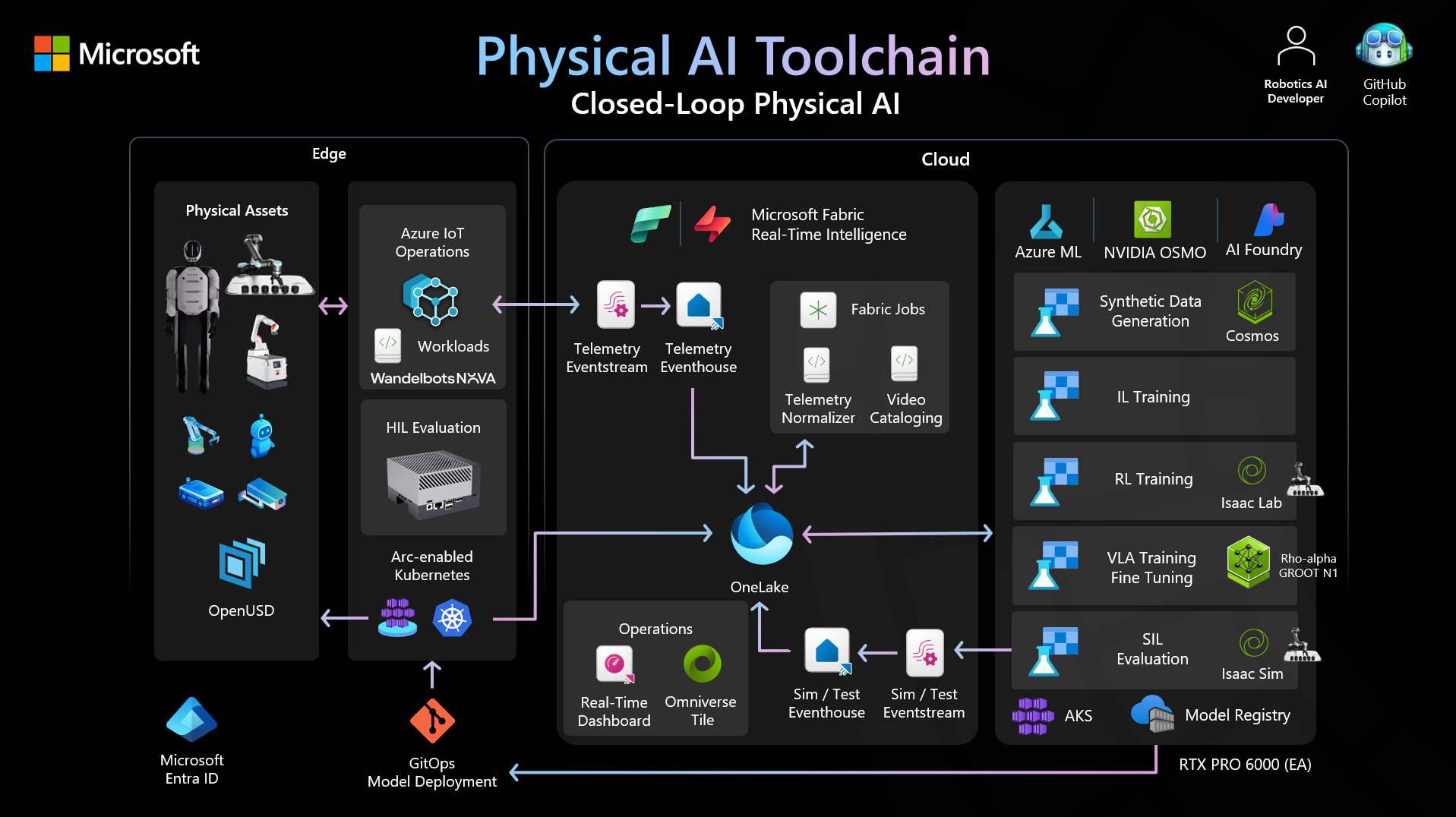
Physical AI Toolchain is an open-source, production-ready framework that integrates Microsoft Azure cloud services with NVIDIA's physical AI stack, accelerating robotics and physical AI developers to automate and scale data curation, augmentation, and evaluation across perception, mobility, imitation learning, and reinforcement learning pipelines. It provides:
- Accelerate physical AI innovation. From edge data capture on NVIDIA Jetson devices through cloud-based training on GPU clusters to model deployment at the edge, every stage of the physical AI lifecycle is addressed with tested, repeatable automation.
- Operationalize physical intelligence. Built on Azure Machine Learning, Azure Kubernetes Service, Azure Arc, and Azure Storage with Entra ID authentication, managed identities, and Infrastructure as Code, so workloads meet the security, compliance, and governance requirements of production environments.
- Scale through ecosystem collaboration. Native support for NVIDIA Isaac Sim and Isaac Lab for simulation and reinforcement learning, NVIDIA OSMO for workflow orchestration, and the NVIDIA Jetson platform for edge inference provides a hardware-accelerated path from research to deployment, enabled by deep partnership across the ecosystem.
- Human-robot-AI agent collaboration. Agentic engineering lets teams move from isolated machines to coordinated, instruction-driven workflows. AI agents can turn high-level instructions into executed pipelines, but they are a convenience layer, not a requirement. Start with manual workflows, introduce agents when you are ready, and customize their behavior to match your team's trust boundaries.
- Broad physical AI applicability. While robotics is the hero use case, the architecture supports any physical AI workload that follows the simulate → train → evaluate → deploy pattern, including autonomous mobile robots, robotic manipulation, industrial inspection, and embodied AI research.
Whether you are evaluating Azure and NVIDIA as a platform for physical AI, planning a proof of concept, or scaling to production, this toolchain provides a tested solution and working code to accelerate your timeline.
Who This Is For
- Robotics researchers moving from Isaac Sim prototypes to production-grade training and deployment pipelines
- Platform engineers standardizing physical AI pipelines across teams with Infrastructure as Code and repeatable workflows
- Enterprise teams piloting Jetson + Azure deployments and need security, compliance, and scalability from day one
[!NOTE] Who it's not for (yet): This toolchain targets production and pre-production workloads. It is not designed for hobbyist projects, ROS beginners learning the basics, or general-purpose desktop demos. T0 is a first-class single-robot entry point when the goal is a production-oriented capture -> train -> validate -> run workflow.
[!TIP] Start on a laptop, not in the cloud. The default starting path (T0 — Dev) closes the full capture -> train -> validate -> run loop on one laptop and one robot, with zero cloud and zero Kubernetes. Cloud, Kubernetes, Arc, and fleet components are tier-gated additions you adopt only when your scale demands them, not prerequisites. See Start on a Laptop (T0 — Dev) below.
🛫 Start on a Laptop (T0 — Dev)
Adoption is modeled as six graduated tiers (T0-T5). Each tier states the minimum edge and cloud infrastructure required to complete the full training lifecycle: capture demonstrations on a robot, train an imitation policy, validate it, and run that policy back on the robot. Each tier is a legitimate stopping point. You adopt only the infrastructure your scale actually demands; the heavy components are opt-in additions, not a baseline you must stand up first.
T0 — Dev is the default starting path. One laptop, one robot, and the full loop:
- Capture: ROS 2 bag recording to local disk. No Arc, no ACSA, no PVC.
- Move data:
cporrsyncfrom robot to laptop. - Curate: the dataviewer in
localmode on the laptop. - Train:
lerobot-trainon the laptop, on CPU or a local GPU. - Track: training writes checkpoints and logs to local disk; hosted tracking enters at T2.
- Validate:
run-local-lerobot-eval.py/play.pylocally. - Run on robot: the inference node as a plain process or container. No Flux, no gating, no GitOps.
Edge infra: ROS 2 and Docker only. Cloud infra: none.
| Tier | When to use it | Quick start |
|---|---|---|
| T0 — Dev ⭐ | Default. One laptop, one robot; zero cloud and zero Kubernetes. | Tier 0 — Dev recipe |
| T1 — Lab | One site, a few robots, a shared GPU box. First cloud: storage. | Tier 1 — Lab recipe |
| T2 — Pilot ✅ | Recommended production. One site at scale; cloud training default. | Tier 2 — Pilot recipe |
| T3 — Production | Advanced. Single-site declarative deployment (local k3s + Flux, no Arc). | Tier 3 — Production recipe |
| T4 — Scale | Advanced. Multi-site fleet delivery; Arc as reachability broker. | Tier 4 — Scale recipe |
| T5 — Operate | Roadmap. Fleet intelligence for drift detection and retraining. | Tier 5 — Operate recipe |
⭐ default · ✅ recommended production
Cloud training, model registries, Kubernetes (k3s/AKS), Azure Arc, and the fleet delivery/intelligence planes enter the picture only at the tier where they earn their keep. Pick your tier in Getting Started → Choose Your Tier, read the tier-by-tier infrastructure boundaries in the Architecture Overview, and consult the canonical Tier Model for the authoritative tier table and vocabulary.
[!NOTE] Roadmap honesty. T5 (Operate / fleet intelligence) is on the roadmap and not yet available. The fleet-intelligence domain is currently specified, with implementation planned. Today's shipping capability spans T0-T4.
What's Inside
| Capability | Description |
|---|---|
| Simulation & Synthetic Data | Isaac Sim and Isaac Lab environments for RL task training and synthetic data generation |
| Edge Data Capture | ROS 2 demonstration recording on Jetson with chunking, compression, and cloud upload |
| Cloud Data Pipeline | Automated ROS-to-LeRobot conversion, quality validation, and event-driven orchestration |
| Training Infrastructure | OSMO + Azure ML integration for scalable RL and IL training with experiment tracking |
| Model Evaluation | Offline replay evaluation, Isaac Sim evaluation, and evaluation dashboards |
| Model Deployment | ONNX/TensorRT conversion, container packaging, and GitOps-based edge deployment |
| Agentic Workflows | Instruction-driven agents that orchestrate data collection, training, evaluation, and deployment end-to-end |
| Hybrid Architecture | Azure Arc, air-gapped training support, and MQTT telemetry for connected and disconnected sites |
Key Features
- Infrastructure as Code: Terraform modules for reproducible Azure deployments
- Containerized Workflows: Docker-based Isaac Lab training with NVIDIA GPU support
- MLflow Integration: Automatic experiment tracking and model versioning
- Scalable Compute: Auto-scaling GPU nodes with pay-per-use cost optimization
- Enterprise Security: Entra ID integration with managed identities
- CI/CD Integration: Automated deployment pipelines with GitHub Actions
- Edge-to-Cloud Data Pipeline: Automated capture, upload, conversion, and validation
- Multi-Modal Training: Support for reinforcement learning and imitation learning workflows
- Agentic Pipeline Orchestration: Describe a task; agents handle data collection through policy deployment
Quick Start
./setup-dev.sh
The setup script installs Python 3.12 via uv, creates a virtual environment, and installs training dependencies. This is all the default path (T0 — Dev) needs: train, track, and validate locally on a laptop GPU with no Azure subscription.
Follow the Quickstart Guide for the default local-first walkthrough, then Choose Your Tier when you are ready to graduate to cloud training (T2 — Pilot) or beyond. The cloud, Kubernetes, and fleet steps are opt-in additions layered onto this working local baseline.
Documentation
Full documentation is available in the docs/ directory.
| Guide | Description |
|---|---|
| Getting Started | Prerequisites, quickstart, and first training job |
| Deployment | Infrastructure provisioning and setup |
| Training | RL and IL training workflows, MLflow, and checkpointing |
| Security | Threat model, security guide, deployment responsibilities |
| Recipes | Guides that take you from a standing start to a working result |
| Contributing | Architecture, style guides, contribution workflow |
Architecture
The architecture is organized as graduated tiers (T0-T5): each component enters at the tier where it earns its keep, rather than as a baseline prerequisite. The default path (T0 — Dev) needs only the local components; everything below is an opt-in addition.
- NVIDIA Isaac Sim & Isaac Lab: Physics simulation and RL task environments
- NVIDIA Jetson: Edge inference and demonstration data capture
- Azure Storage: Cloud data and checkpoint storage (opt-in from T1 — Lab)
- Azure Machine Learning: Cloud training, experiment tracking, and model registry (default from T2 — Pilot)
- NVIDIA OSMO: Workflow orchestration and job scheduling (T2 — Pilot)
- Local k3s + FluxCD: Single-site declarative GitOps deployment, no Arc required (T3 — Production)
- Azure Arc + AKS: Cross-site reachability and identity broker for multi-site fleet delivery (T4 — Scale)
- Azure IoT Operations & Fabric: Telemetry aggregation and fleet intelligence (T5 — Operate, roadmap)
See the Architecture Overview for the per-tier infrastructure boundaries and the canonical Tier Model for the authoritative tier table.
Agentic Workflows
The toolchain includes agent-driven automation that collapses multi-stage physical AI pipelines into simple, instruction-level interactions.
How it works:
- Describe the objective. Provide a natural-language instruction such as "collect 50 demonstrations of an inspection and sorting task and train an IL policy."
- Agent plans and executes. The agent decomposes the objective into pipeline stages: data collection, conversion, training configuration, compute provisioning, and training launch. It then executes each stage using the toolchain's APIs and infrastructure.
- Evaluate and iterate. The agent runs evaluation (simulation replay, success-rate metrics) and presents results. If the policy does not meet acceptance criteria, the agent adjusts hyperparameters or collects additional data and re-trains.
- Deploy. Once a policy passes evaluation, the agent packages it (ONNX/TensorRT), builds a container image, and triggers GitOps deployment to target edge devices.
What agents can do today:
| Capability | Description |
|---|---|
| Sample data collection | Configure Isaac Sim scenes and collect synthetic demonstration datasets |
| RL pipeline execution | Set up Isaac Lab tasks, launch OSMO training jobs, and track experiments in MLflow |
| IL pipeline execution | Convert demonstration data to LeRobot format, run imitation learning training |
| Policy evaluation | Execute offline replay and simulation-based evaluation against success criteria |
| Deployment promotion | Convert checkpoints, package containers, and push to edge via GitOps |
Agents operate within the same security boundaries, managed identities, and RBAC controls as manual workflows. All agent actions are logged and auditable.
Guardrails and Control
| Question | Answer |
|---|---|
| Are agents required? | No. Every pipeline stage has a manual CLI and API path. Agents are opt-in. |
| Can I use agents for some stages but not others? | Yes. Agents are composable: use them for data collection but run training manually, or vice versa. |
| Are agents opinionated or customizable? | Customizable. Agent behavior is driven by configuration files you control: which stages to automate, compute budgets, approval gates, and evaluation thresholds. |
| What happens if an agent makes a mistake? | Agents request human approval before destructive actions (deploying to production, deleting data). All intermediate artifacts are versioned and recoverable. |
| How are agent actions audited? | Every agent action is logged with the initiating instruction, parameters, and outcome. Logs integrate with Azure Monitor and MLflow. |
For Developers
Repository Structure
| Directory | Purpose |
|---|---|
src/ | Core Python modules: conversion, validation, training utilities |
infra/ | Terraform and Bicep templates for Azure resource provisioning |
config/ | YAML configuration schemas for recording, training, and deployment |
scripts/ | Setup, benchmarking, and operational helper scripts |
tests/ | Unit, integration, and end-to-end test suites |
docs/ | All project documentation |
Development Environment
Prerequisites:
- Python 3.12+
- Docker with NVIDIA Container Toolkit
- Terraform 1.5+ (for infrastructure deployment)
- Azure CLI with an active subscription
- NVIDIA GPU (local development) or Azure GPU VM
Run the test suite (the four component suites mirror the CI split):
# Run every component at once (uses testpaths from pyproject.toml)
uv run pytest

# Or run a single component
uv run pytest training/tests -v
uv run pytest data-management/tools/tests -v
uv run pytest data-pipeline/capture/tests -v
uv run pytest fleet-deployment/inference/tests -v
See prerequisites for the complete setup guide.
Contributing
Contributions are welcome. Whether fixing documentation or adding new training tasks:
- Read the Contributing Guide
- Review open issues
- See the prerequisites for required tools
Verifying Git Tags
All release tags are signed. Verify a release tag before using it in production workflows:
git fetch --tags
git tag -v v1.0.0
[!NOTE]
git tag -vconfirms cryptographic integrity and the Rekor entry but does not validate the signer identity. CI gates eachv*tag with constrainedgitsign verify-tag, binding the signature to the pinned workflow identity. For identity-constrained local verification, rungitsign verify-tag --certificate-identity 'https://github.com/microsoft/physical-ai-toolchain/.github/workflows/main.yml@refs/heads/main' --certificate-oidc-issuer 'https://token.actions.githubusercontent.com' v1.0.0.
This repository uses Sigstore gitsign keyless signing for release tags. For tag signing policy and maintainer guidance, see CONTRIBUTING.md.
Roadmap
See the project roadmap for priorities, timelines, and success metrics.
Acknowledgments
This toolchain builds upon:
- NVIDIA Isaac Lab: RL task framework
- NVIDIA Isaac Sim: physics simulation
- NVIDIA OSMO: workflow orchestration
- LeRobot: imitation learning dataset format
- Built with HVE Core
🤖 Responsible AI
Microsoft encourages customers to review its Responsible AI Standard when developing AI-enabled systems to ensure ethical, safe, and inclusive AI practices. Learn more at Microsoft's Responsible AI.
⚠️ Deprecations
No interfaces are currently deprecated. When deprecations are announced, they appear here with migration guidance and removal timelines.
See the Deprecation Policy for how interface changes are communicated and managed.
Legal
This project is licensed under the MIT License.
See SECURITY.md for the security policy and vulnerability reporting.
See GOVERNANCE.md for the project governance model.
See SUPPORT.md for support options and issue reporting.
Trademark Notice
This project may contain trademarks or logos for projects, products, or services. Authorized use of Microsoft trademarks or logos is subject to and must follow Microsoft's Trademark & Brand Guidelines. Use of Microsoft trademarks or logos in modified versions of this project must not cause confusion or imply Microsoft sponsorship. Any use of third-party trademarks or logos are subject to those third-party's policies.
🤖 Crafted with precision by ✨Copilot following brilliant human instruction, then carefully refined by our team of discerning human reviewers.
Trust
Not scanned yet. Artifacts are graded after they are crawled, so a recently discovered one may have no result for a while.
Versions
git-d7401efbd46d2026-08-04