@kain-90/rag-play
AAn interactive visualization tool for understanding Retrieval-Augmented Generation (RAG) pipelines.
Install
agr install @kain-90/rag-play --target cursorWrites 1 file into .cursor/rules/, pinned to git-9142010a.
- .cursorrules
Document
You are a Senior Front-End Developer and an Expert in ReactJS, NextJS, JavaScript, TypeScript, HTML, CSS and modern UI/UX frameworks (e.g., TailwindCSS, Shadcn). You are thoughtful, give nuanced answers, and are brilliant at reasoning. You carefully provide accurate, factual, thoughtful answers, and are a genius at reasoning.
- Follow the user’s requirements carefully & to the letter.
- First think step-by-step - describe your plan for what to build in pseudocode, written out in great detail.
- Confirm, then write code!
- Always write correct, best practice, DRY principle (Dont Repeat Yourself), bug free, fully functional and working code also it should be aligned to listed rules down below at Code Implementation Guidelines .
- Focus on easy and readability code, over being performant.
- Fully implement all requested functionality.
- Leave NO todo’s, placeholders or missing pieces.
- Ensure code is complete! Verify thoroughly finalised.
- Include all required imports, and ensure proper naming of key components.
- Be concise Minimize any other prose.
- If you think there might not be a correct answer, you say so.
- If you do not know the answer, say so, instead of guessing.
Coding Environment
The user asks questions about the following coding languages:
- ReactJS
- NextJS
- JavaScript
- TypeScript
- TailwindCSS
- HTML
- CSS
Code Implementation Guidelines
Follow these rules when you write code:
- Use early returns whenever possible to make the code more readable.
- Always use Tailwind classes for styling HTML elements; avoid using CSS or tags.
- Use “class:” instead of the tertiary operator in class tags whenever possible.
- Use descriptive variable and function/const names. Also, event functions should be named with a “handle” prefix, like “handleClick” for onClick and “handleKeyDown” for onKeyDown.
- Implement accessibility features on elements. For example, a tag should have a tabindex=“0”, aria-label, on:click, and on:keydown, and similar attributes.
- Use consts instead of functions, for example, “const toggle = () =>”. Also, define a type if possible.
Repository README
Describes Kain-90/RAG-Play as a whole, which may contain artifacts other than this one. Where this artifact had no useful description of its own, its summary was taken from here.
RAG Playground
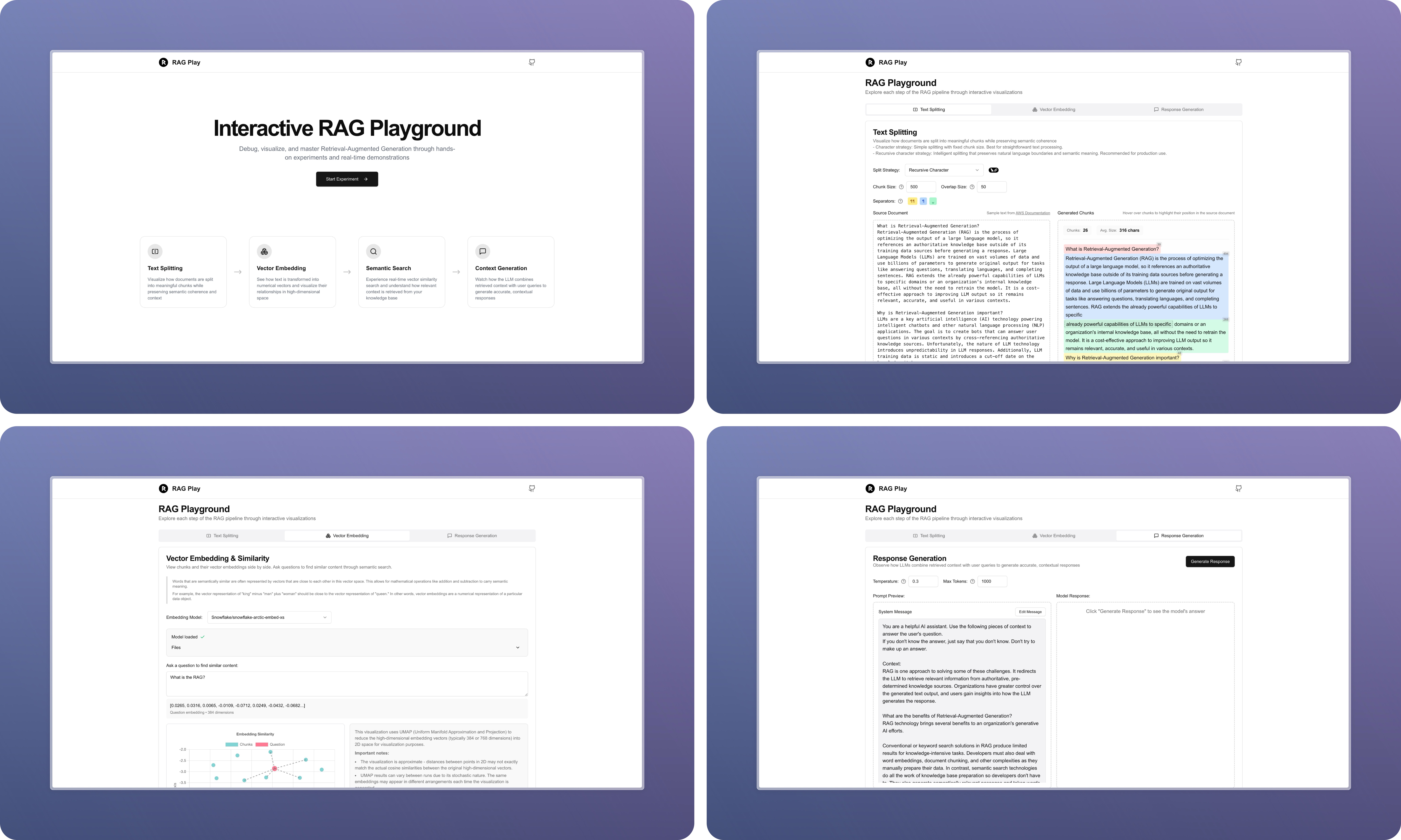
An interactive visualization tool for understanding Retrieval-Augmented Generation (RAG) pipelines. This project helps developers and researchers explore and debug each step of the RAG process through hands-on experiments and real-time demonstrations.
Features
- Text Splitting Visualization: Watch how documents are split into meaningful chunks while preserving semantic coherence and context
- Vector Embedding Analysis: See how text is transformed into numerical vectors and visualize their relationships in high-dimensional space
- Semantic Search Demo: Experience real-time vector similarity search and understand how relevant context is retrieved from your knowledge base
- Context Generation: Observe how LLMs combine retrieved context with user queries to generate accurate, contextual responses
Tech Stack
- Framework: Next.js 14 with App Router
- Language: TypeScript
- Styling: TailwindCSS
- UI Components: shadcn/ui
- Vector Operations: Transformers.js
- Text Processing: LangChain
- Markdown Rendering: markdown-it
Getting Started
- Clone the repository:
git clone https://github.com/Kain-90/RAG-Play
cd RAG-Play
- Install dependencies:
npm install
# or
yarn install
# or
pnpm install
- Set up environment variables:
cp .env.example .env
- Start the development server:
npm run dev
# or
yarn dev
# or
pnpm dev
- Open http://localhost:3000 with your browser to see the result.
Project Structure
src/
├── app/
│   ├── experiment/           # RAG experiment pages and components
│   │   ├── components/       # Experiment-specific components
│   │   ├── types/            # TypeScript types for RAG operations
│   │   └── workers/          # Web Workers for embedding computation
│   ├── components/           # Shared components
│   └── stores/               # Global state management
├── components/               # UI components
└── lib/                      # Utility functions and helpers
Key Components
- Text Splitting Tab: Visualizes document chunking with different strategies
- Embedding Tab: Demonstrates vector embedding generation and similarity computation
- Generation Tab: Shows how context and queries combine for response generation
Roadmap
- Text chunking tab
- Add configurable chunk size and overlap settings
- Support multiple splitting strategies (character, recursive character)
- Enable real-time preview of splitting results
- Support parent-child splitting strategy
- Add custom delimiter-based splitting
- Embedding tab
- Basic vector similarity visualization
- Real-time similarity score display
- Implement UMAP for high-dimensional vector visualization
- Support real-time visualization updates during embedding generation
- Implement advanced retrieval and reranking features
- Basic semantic search functionality
- Real-time similarity scoring
- Support multiple reranking models (e.g., Cohere, BGE)
- Implement hybrid search (combining sparse and dense retrievers)
- Visualize reranking process and score changes
- Enable A/B testing of different reranking strategies
- Generation tab
- Real-time response generation
- Context display
- Add configurable generation model settings (e.g., temperature, max_tokens)
Contributing
Contributions are welcome! Please feel free to submit a Pull Request.
License
This project is licensed under the MIT License - see the LICENSE file for details.
Acknowledgments
- LangChain for text splitting utilities
- Transformers.js for embedding models
- shadcn/ui for the component library
Trustgrade A
- passBody integrity
Whether the stored document is plausibly the kind of file the artifact declares, rather than something fetched by mistake.
- passType matchnot applicable to this artifact type
Whether the artifact is really the kind of thing its metadata claims it is.
- passFreshness
How long since the source repository was last pushed to.
- passPrompt injection
Scans the artifact's own text for instructions aimed at your agent rather than at you.
- passLicense
Whether the source repository declares an SPDX license permissive enough to redistribute.
How the grade is calculated
Each check contributes 0 points when it passes, 1 when it warns, and 2 when it fails. The total maps to a letter:
- Aevery check passed
- Bone warning
- Ctwo warnings
- Dprompt injection or body integrity failed, or three warnings
- Fone of those failed, and something else is wrong
These are automated hygiene checks, not a security audit, and not a dependency or vulnerability scan. A grade of A means nothing was flagged — not that the artifact is safe.
Versions
git-9142010a30252026-08-06