@datadog/datadog-static-analyzer
Adatadog-static-analyzer is the static analyzer engine for Datadog static analysis.
Install
agr install @datadog/datadog-static-analyzer --target codexWrites 1 file into AGENTS.md, pinned to git-3148bae0.
- AGENTS.md
Document
Overview
This project is Datadog's static analyzer and secret detection tool, used to find code patterns, detect violations, and identify secrets.
The static code analysis part relies heavily on tree-sitter.
Secret detection relies on Datadog SDS.
Code Structure
crates/bincontains all the binariescrates/clicontains all code for the command-line features (creating CSV, manipulating files, etc)crates/commoncontains all code common to the CLI and the servercrates/secretscontains the code specific to the secrets scanning productcrates/static-analysis-kernelcontains the code specific to the static analyzercrates/static-analysis-servercontains the code specific to the static analyzer server (used in IDE)
Testing
- NEVER write table tests.
- Always run tests (e.g.
cargo test) - Always run the format checker
cargo fmt -- --check - Always run clippy
cargo clippy -- -D warnings
How to release a new version?
Invoke the script ./misc/release.sh
Repository README
Describes DataDog/datadog-static-analyzer as a whole, which may contain artifacts other than this one. Where this artifact had no useful description of its own, its summary was taken from here.
Datadog Static Analyzer
[!TIP] Datadog supports open source projects. Learn more on Datadog for Open Source Projects.
datadog-static-analyzer is the static analyzer engine for Datadog static analysis.
How to use Datadog Static Analysis Tool
Quick Start
Installation on macOS
On macOS, you can install the static analyzer using Homebrew:
brew install datadog-static-analyzer
Installation on other platforms
- Download the binary from the releases
- Extract and run the analyzer on your repository (as shown below)
Running the analyzer
Once installed, run the analyzer with the default rules:
datadog-static-analyzer --directory /path/to/directory --output report.csv --format csv
Using Docker
docker run -it --rm -v /path/to/directory:/data ghcr.io/datadog/datadog-static-analyzer:latest --directory /data --output /data/report.csv --format csv
For more information on the Docker container, see the documentation here.
If you encounter an issue, read the Frequently Asked Questions first, it may contain the solution to your problem.
Advanced Usage
You can choose the rules to use to scan your repository by creating a code-security.datadog.yaml file.
First, make sure you follow the documentation
and create a code-security.datadog.yaml file at the root of your project with the rulesets you want to use.
Example of YAML file
schema-version: v1.0
sast:
  use-rulesets:
    - python-code-style
    - python-best-practices
    - python-inclusive
  global-config:
    ignore-paths:
      - src/experiments
CI/CD Integration
You can use it in your CI/CD pipeline using our integration:
If you use it in your own CI/CD pipeline, you can integrate the tool directly: see the Datadog documentation for more information.
IntelliJ JetBrains products
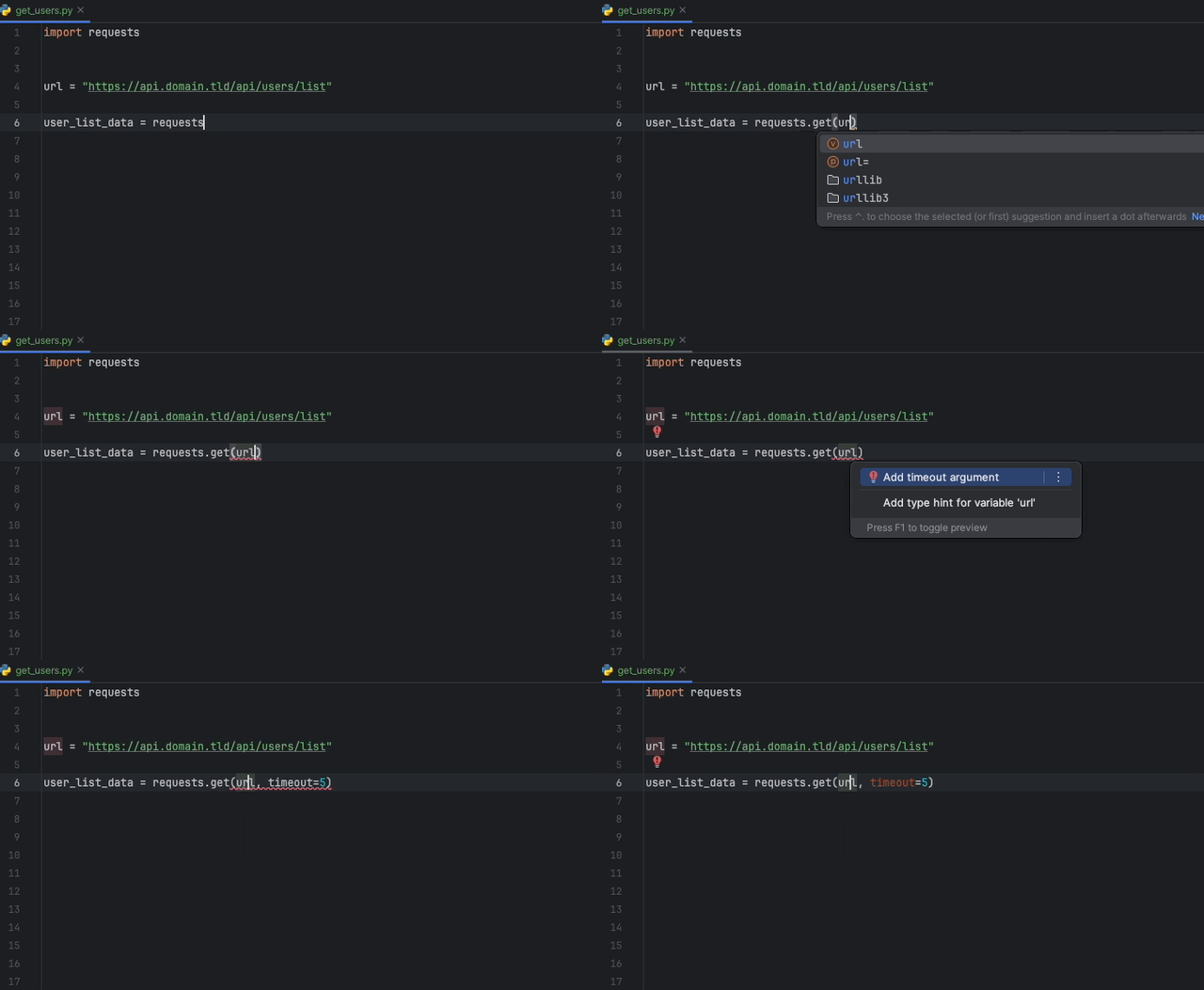
The Datadog IntelliJ extension allows you to use the static analyzer directly from all JetBrains products. Create a configuration file (reference here), download the extension, and you can start using it. You can see below an example of a suggestion to add a timeout when fetching data with Python with the requests module.
VS Code
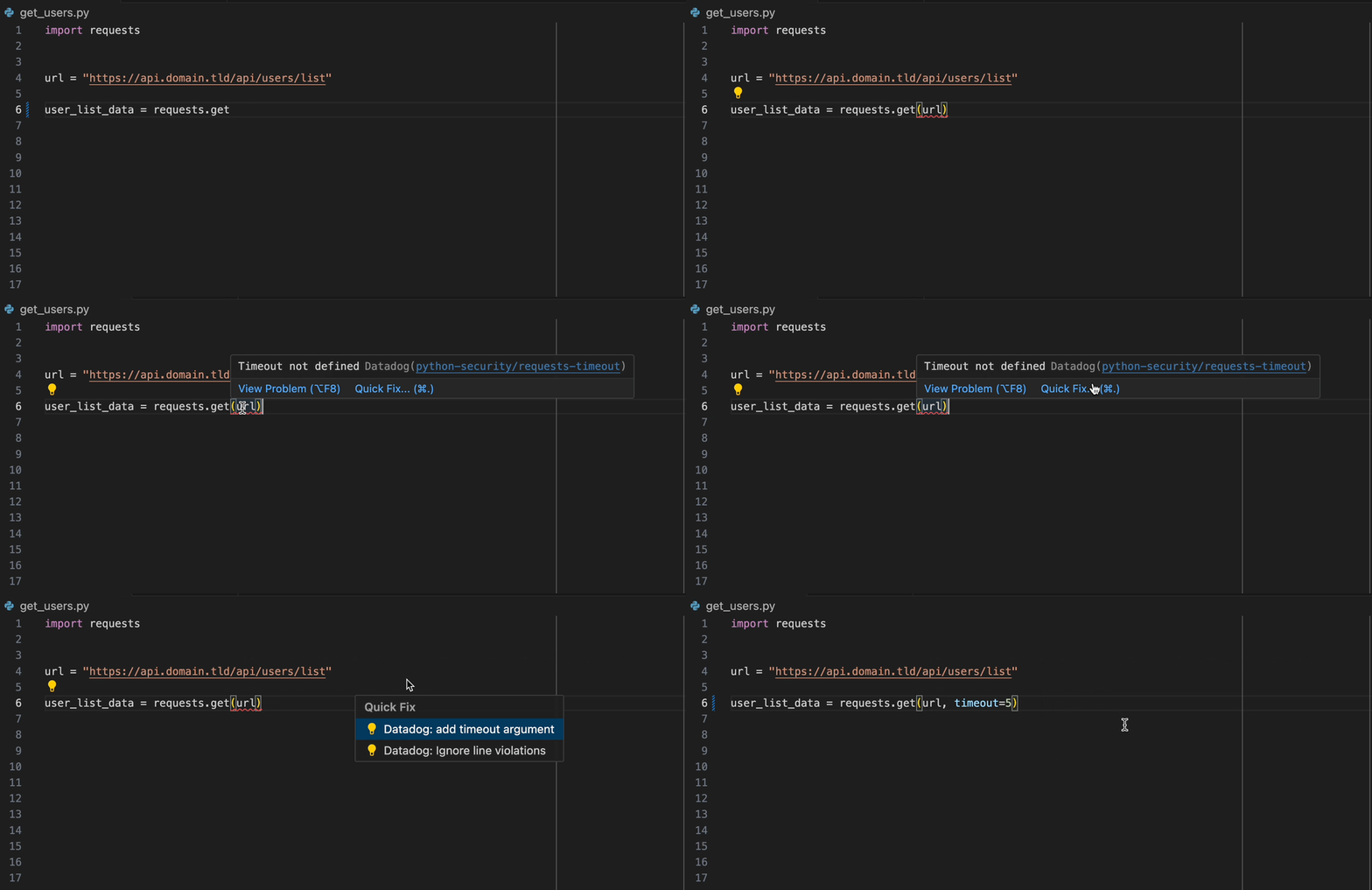
The Datadog VS Code extension allows you to use the static analyzer directly from VS Code. Create a configuration file (reference here), download the extension, and you can start using it.
List of rulesets
When you onboard on the Datadog product, you can select the ruleset you want/need. If you are not using Datadog directly, there is the list of common used rulesets available in the Datadog static analysis product per language.
The complete list is available in our documentation.
The list of rulesets is available in RULESETS.md.
Download
Download the latest release for your system and architecture from the release page.
To get the static analyzer via shell:
curl -L -O https://www.github.com/DataDog/datadog-static-analyzer/releases/latest/download/datadog-static-analyzer-<target>.zip
Example to get the x86_64 binary for Linux:
curl -L -O https://www.github.com/DataDog/datadog-static-analyzer/releases/latest/download/datadog-static-analyzer-x86_64-unknown-linux-gnu.zip
Usage
datadog-static-analyzer -i <directory> -o <output-file>
Mac OS X users
If you installed via Homebrew (brew install datadog-static-analyzer), you can skip this section.
If you downloaded the binary manually, it cannot be executed as is. You need to flag the binary as safe to execute using the following command:
xattr -dr com.apple.quarantine datadog-static-analyzer
Options
-for--format: format of the output file.-f sarifproduces a SARIF-compliant file-ror--rules: provides a file that contains all rules (rules can be put in a file usingdatadog-export-rulesets)-cor--cpus: number of cores used to analyze (count about 1GB of RAM usage per core)-oor--output: output file-por--ignore-path: path (pattern/glob) to ignore; accepts multiple-xor--performance-statistics: show performance statistics for the analyzer-gor--add-git-info: add Git-related information (sha, etc) into the SARIF report when using -f sarif--fail-on-any-violation: make the program exit a non-zero exit code if there is at least one violation of a given severity.-wor--diff-aware: enable diff-aware scanning (see dedicated notes below)
Configuration
Set the following variables to configure an analysis:
DD_SITE: the Datadog site parameter used to fetch rules (view list) (default:datadoghq.com)
Configuration file
The static analyzer can be configured using a code-security.datadog.yaml file at the root directory of the repository.
The file must begin with schema-version: v1.0 and should have a sast object specifying the configuration.
schema-version: v1.0
sast:
  # ... configuration goes here
The sast object supports the following fields:
| Property | Type | Description | Default |
|---|---|---|---|
use-default-rulesets | Boolean | Whether to enable Datadog default rulesets. | true |
use-rulesets | Array | A list of ruleset names to enable (custom rulesets or Datadog default rulesets). Enabled in addition to the default rulesets if use-default-rulesets is true. | None |
ignore-rulesets | Array | A list of ruleset names to disable. Takes precedence over use-rulesets and use-default-rulesets. | None |
ruleset-configs | Object | A map from ruleset name to its configuration. | None |
global-config | Object | Global settings for the repository. | None |
Ruleset configuration
Each entry in the ruleset-configs map configures a specific ruleset. A ruleset does not need to be listed in use-rulesets for its configuration to apply; the configuration is used whenever the ruleset is enabled, including through use-default-rulesets.
| Property | Type | Description | Default |
|---|---|---|---|
only-paths | Array | File paths or glob patterns. Only files matching these patterns are processed for this ruleset. | None |
ignore-paths | Array | File paths or glob patterns to exclude from analysis for this ruleset. | None |
rule-configs | Object | A map from rule name to its configuration. | None |
Rule configuration
Each entry in the rule-configs map configures a specific rule:
| Property | Type | Description | Default |
|---|---|---|---|
only-paths | Array | File paths or glob patterns. The rule is applied only to files matching these patterns. | None |
ignore-paths | Array | File paths or glob patterns to exclude. The rule is not applied to files matching these patterns. | None |
arguments | Object | Parameters and values for the rule. Values can be scalars or defined per path. | None |
severity | String or Object | The rule severity. Valid values: ERROR, WARNING, NOTICE, NONE. Can be a single value or defined per path. | None |
category | String | The rule category. Valid values: BEST_PRACTICES, CODE_STYLE, ERROR_PRONE, PERFORMANCE, SECURITY. | None |
Argument and severity configuration
Arguments and severity can be defined in one of two formats:
- Single value: Applies to the whole repository.
arguments:
  argument-name: value
severity: ERROR
-
Per-path mapping: Different values for different subtrees. The longest matching path prefix applies. Use
/as a catch-all default.arguments: argument-name: /: value_default path/example: value_specific severity: /: WARNING path/example: ERROR
The category field takes a single string value for the whole repository.
Global configuration
The global-config object controls repository-wide settings and has the following optional fields:
| Property | Type | Description | Default |
|---|---|---|---|
only-paths | Array | File paths or glob patterns. Only matching files are analyzed. | None |
ignore-paths | Array | File paths or glob patterns to exclude. Matching files are not analyzed. | None |
use-gitignore | Boolean | Whether to include entries from the .gitignore file in ignore-paths. | true |
ignore-generated-files | Boolean | Whether to include common generated file patterns in ignore-paths. | true |
max-file-size-kb | Number | Maximum file size (in kB) to analyze. Larger files are ignored. | 200 |
An annotated example of a configuration file:
schema-version: v1.0
sast:
  # Always ensure the following rulesets are run (in addition to the Datadog defaults).
  use-rulesets:
    - python-inclusive
    - my-custom-python-rules
  # Never use the following rulesets (even if they are in the Datadog defaults).
  ignore-rulesets:
    - python-pandas
  ruleset-configs:
    # Configuration for the `python-best-practices` ruleset.
    python-best-practices:
      # Do not apply any of the rules in this ruleset to files that match `**/*_model.py`.
      ignore-paths:
        - "**/*_model.py"
      rule-configs:
        # Special configuration for the `python-best-practices/no-generic-exception` rule.
        no-generic-exception:
          # Treat violations of this rule as errors.
          severity: ERROR
          # Classify violations of this rule under the "code style" category.
          category: CODE_STYLE
          # Only apply this rule to files under the `src/new-code` subtree.
          only-paths:
            - src/new-code
    # Configuration for the `python-code-style` ruleset.
    python-code-style:
      rule-configs:
        max-function-lines:
          # Set arguments for the `python-code-style/max-function-lines` rule.
          arguments:
            # Set the `max-lines` argument to 150 in the whole repository.
            max-lines: 150
        max-class-lines:
          # Set arguments for the `python-code-style/max-class-lines` rule.
          arguments:
            # Set different values for the `max-lines` argument in different subtrees.
            max-lines:
              # 100 lines by default.
              /: 100
              # 75 lines under the `src/new-code` subtree.
              src/new-code: 75
  # Repository-wide settings.
  global-config:
    # Analyze only files in the `src` and `imported` subtrees.
    only-paths:
      - src
      - imported
    # Do not analyze any files in the `src/third_party` subtree.
    ignore-paths:
      - src/third_party
    # Do not analyze files larger than 100 kB.
    max-file-size-kb: 100
Another example that shows every option being used:
schema-version: v1.0
sast:
  use-default-rulesets: false
  use-rulesets:
    - python-code-style
  ignore-rulesets:
    - python-pandas
  ruleset-configs:
    python-code-style:
      ignore-paths:
        - src/third_party
        - src/**/*_test.py
      only-paths:
        - src
        - imported/**/new/**
      rule-configs:
        max-function-lines:
          severity: WARNING
          category: PERFORMANCE
          ignore-paths:
            - src/new-code
            - src/new/*_gen.py
          only-paths:
            - src/new
            - src/**/new-code/**
          arguments:
            max-lines: 150
            min-lines:
              /: 10
              src/new-code: 0
  global-config:
    ignore-paths:
      - dist
      - lib/**/*.py
    only-paths:
      - src
      - imported/**/*.py
    use-gitignore: false
    ignore-generated-files: false
    max-file-size-kb: 256
Configuration file schema
You can use the included JSON schema definition to check the syntax of your configuration file:
- Execute
npx --yes ajv-cli@5.0.0 validate --spec=draft2020 -s schema/sast/v1.0/validation.schema.json -r schema/sast/v1.0/schema.json -d path/to/your/code-security.datadog.yaml
Diff-Aware Scanning
Diff-aware scanning is a feature of the static-analyzer to only scan the files that have been recently changed. Diff-aware scans use previous results and add only the violations from the changed files.
In order to use diff-aware scanning, you must be a Datadog customer.
To use diff-aware scanning:
- Set up the
DD_SITEenvironment variable according to the Datadog datacenter you are using (https://docs.datadoghq.com/getting_started/site/) - Set up the
DD_APP_KEYandDD_API_KEYenvironment variables with your Datadog application and API keys - Run the static analyzer with option
--diff-aware
When using diff-aware, the static analyzer will connect to Datadog and attempt a previous analysis to use. If any problem occurs and diff-aware cannot be used, the analyzer will output an error like the one below and continue with a full scan.
You can use the option --debug true to troubleshoot further if needed.
$ datadog-static-analyzer --directory /path/to/code --output output.sarif --format sarif --diff-aware

...
diff aware not enabled (error when receiving diff-aware data from Datadog with config hash 16163d87d4a1922ab89ec891159446d1ce0fb47f9c1469448bb331b72d19f55c, sha 5509900dc490cedbe2bb64afaf43478e24ad144b), proceeding with full scan.
...
Other Tools
datadog-export-rulesets
Export rulesets from the API into a file
cargo run --locked --bin datadog-export-rulesets -- -r <ruleset> -o <file-to-export>
More
Contribute
See file CONTRIBUTING.md for more information as well as DEVELOPMENT.md for all details about testing and coding guidelines.
More information
Trustgrade A
- passBody integrity
Whether the stored document is plausibly the kind of file the artifact declares, rather than something fetched by mistake.
- passType matchnot applicable to this artifact type
Whether the artifact is really the kind of thing its metadata claims it is.
- passFreshness
How long since the source repository was last pushed to.
- passPrompt injection
Scans the artifact's own text for instructions aimed at your agent rather than at you.
- passLicense
Whether the source repository declares an SPDX license permissive enough to redistribute.
How the grade is calculated
Each check contributes 0 points when it passes, 1 when it warns, and 2 when it fails. The total maps to a letter:
- Aevery check passed
- Bone warning
- Ctwo warnings
- Dprompt injection or body integrity failed, or three warnings
- Fone of those failed, and something else is wrong
These are automated hygiene checks, not a security audit, and not a dependency or vulnerability scan. A grade of A means nothing was flagged — not that the artifact is safe.
Versions
git-3148bae061af2026-08-06